
For the next 21 CAs and firms: price locked forever and 7 days money back. Price increase after 31 December 2026. 21 of 21 left. See pricing

What is on a client's page?

Their identifiers, contact and notes, compliance profile and every notice filed under them, with buttons for Edit, Calendar and Documents.

Updated 29 Sept 2026

What you see

  • Statutory identifiers: PAN and every GSTIN, each easy to copy.
  • Contact and Notes. Notes are only visible to your firm.
  • Compliance profile.
  • Notices: every notice filed under this client.
  • Edit, Calendar and Documents at the top.
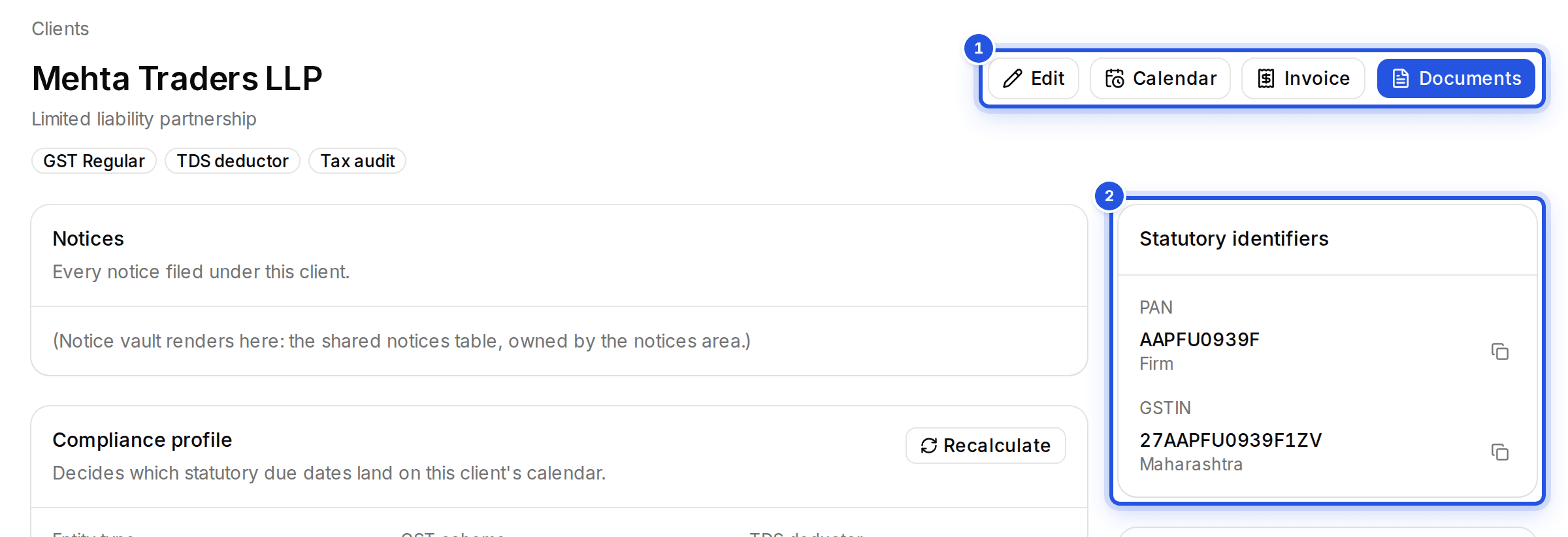
A client page with two numbered marks: 1 the Edit, Calendar, Invoice and Documents buttons and 2 the Statutory identifiers card.
Shortcuts across the top, identifiers on the right.

Was this helpful?

Still stuck? Write to support and we will get back to you. Contact support

Try it on your real work.

Don’t watch a demo. Upload a real notice, ask a real research question, try a client’s books or run a reconciliation.

  1. Upload
  2. Check
  3. Approve
  4. Decide
Start free 14-day trial

No card required.