
How do I prepare Form 26 workpapers?
Open the client, choose Tax audit and start a file for the tax year. Import the trial balance and day book, run the checks, review every clause on the board and export the drafts.
Updated 3 Oct 2026
Steps
- Step 1: Open the client and choose Tax audit, then Start tax audit. Pick the tax year and confirm the assessee status, the nature of business and whether the accounts are audited under another law.
- Step 2: On Upload data, import the trial balance and the day book (both required) and any other file you have: financial statements, GST returns, Form 26AS, AIS, the vendor list, related parties and the asset register. Upload, Choose from Documents or Paste each one.
- Step 3: On Check data, choose Run checks. Fix any errors the data checks list, import again and run them again.
- Step 4: On Clauses, start with the Exceptions band, then open each clause. Add what it needs under Your input, choose Save and re-run checks, write or draft the remark and choose Mark reviewed.
- Step 5: On Export, download the Excel workpaper pack, the Form 26 draft and the exceptions memo. Draft query letter writes to the client for every open item.
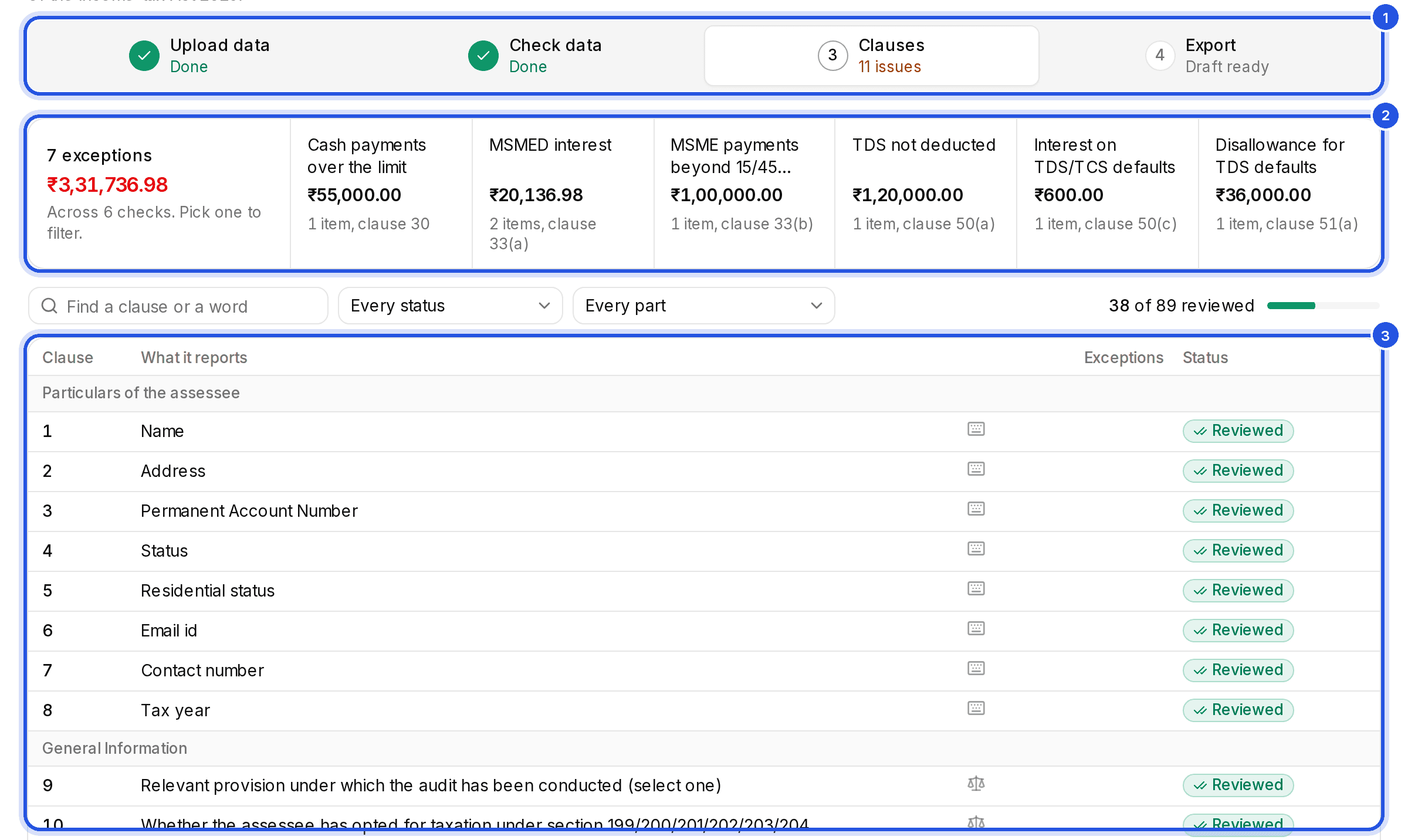
Reading the clause board
- Exceptions found: the books show something the clause must report, such as a cash payment over the limit. The rows behind it are highlighted and each links to its voucher.
- Needs your input: the clause cannot be worked out from the books alone. The panel says what it needs.
- Not yet verified: a rule the check uses has not been confirmed against the notified text yet. Check the figure yourself.
- Filled and Input only: computed with nothing to report, or answered by you.
- Arrow keys move down the board, Enter opens a clause, R marks it reviewed and / finds a clause.
Figures are computed by code from the imported books; only the wording of a remark or the query letter is drafted. Charter never signs or files: the drafts are for you to review and sign.
Was this helpful?
Still stuck? Write to support and we will get back to you. Contact support