
How do I review transactions before they post?
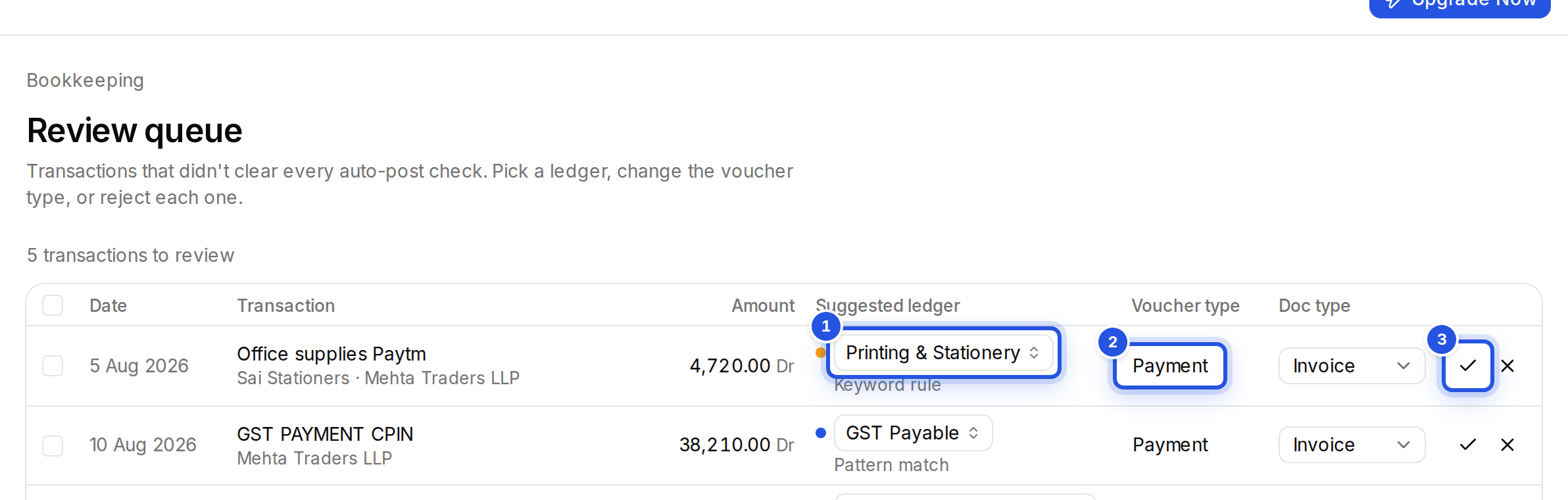
Open the review queue, check the suggested ledger and voucher type for each row, then Accept or Reject it. Keyboard shortcuts make it quick.
Updated 29 Sept 2026
Steps
- Step 1: In Bookkeeping, choose Open the review queue.
- Step 2: Each row shows the Suggested ledger, what it Posts to and the Voucher type.
- Step 3: Press Enter to Accept, x to Reject, or e to choose a different ledger.
- Step 4: Change the voucher type from the row if it is wrong: Payment, Receipt, Contra, Journal, Sales, Purchase, Credit note or Debit note.
Accepting many at once
Use Accept suggestions at or above confidence with its bar to accept every row above it. Select rows for one client to assign a single ledger to all of them.
Was this helpful?
Still stuck? Write to support and we will get back to you. Contact support