
Software for CA Firms: A GST and Tax Suite Comparison
Compare software for CA firms on GST reconciliation, tax research, bookkeeping and practice management, with clear criteria for choosing a fit.
Published 18 min read
India had 100,138 registered CA firms employing 183,642 professionals as of 1 October 2025, according to figures attributed to the Institute of Chartered Accountants of India and reported by The Economic Times CFO. That scale reframes the buying question: software for CA firms isn't just about replacing a spreadsheet or speeding up one return. It needs to move work reliably across client records, reconciliation, review, drafting and the ledger.
A useful comparison starts with the handoffs. Can a GST mismatch become a client follow-up, retain its supporting evidence and lead to a reviewed voucher, without staff retyping the same details? And can the partner open the source behind a figure before signing? Those tests matter more than a long feature list or an AI label.
Table of Contents
- Core Workflows Every CA Software Suite Must Cover
- Test the handoffs, not just the modules
- Suite Types Compared Before Any Demo
- Count what doesn't transfer
- Judging Source Tracing and Client Data Handling
- Separate calculations from drafting
- GST Reconciliation Exceptions and What to Do With Them
- Make every exception reviewable
- How to Move Bookkeeping Data Into TallyPrime
- Define a clean run
- Pricing Models and What They Cost Small-Client Work
- Price the work you actually do
- How Different Firm Types Choose a Suite
- Choose the Suite That Fits Your Firm This Quarter
Core Workflows Every CA Software Suite Must Cover
Which workflows must one suite cover before it saves time rather than adding another login? Start with three questions: what work consumes the most hours, where does information get re-entered, and can a reviewer verify the output? The answers should shape the demo, not the order of a vendor's feature tour.
In 2025, 85% of respondents reported a positive experience with India's GST system, up from 59% in 2022, according to Deloitte India's GST@8 Survey of 963 senior executives (Deloitte India). For CA firms, that digitally mediated work makes reliable data movement between books, GST records and review tasks essential.
| Workflow | Common bottleneck | What to verify | Charter AI coverage |
|---|---|---|---|
| Bookkeeping and voucher preparation | Retyping bank and invoice data | Statement and invoice ingestion, suggested ledgers, rules-based posting | Unlimited bookkeeping workflows with suggested ledgers and voucher preparation |
| GST reconciliation | Matching GSTR-2A/2B, e-invoices and e-way bills by hand | Exception classes, period snapshots and an audit trail for each match | GSTR-2A/2B, e-invoice and e-way bill matching, with matched, missing and mismatch classes |
| Notice replies and drafting | Starting from a blank page | Source-linked citations, facts checked against the uploaded PDF, Word and PDF export | Source-linked notice drafts, checked against uploaded PDFs, with Word and PDF export |
| Tax research | Scattered judgments, circulars and notifications | Links to primary sources, including statutes and case law | Source-linked research across judgments, CBIC notifications, circulars and statute text |
| Compliance calendar | Missed GST and TDS due dates across clients | Set-up by registration type, reminders and a daily digest | GST and TDS dates per client, with reminders 7 days before, 1 day before and on the day |
| Client documents | Files spread across email and drives | Search, encryption and access control by client | Client workspaces with document vault, search and encryption |
Test the handoffs, not just the modules
A suite earns its place when its workflows pass information forward. A reconciliation exception should be assignable for client follow-up, retain the supporting record and, once reviewed, feed a voucher or ledger correction. If staff must copy the same invoice details into separate products, the software has added a handoff instead of removing one.
Charter AI is built for Indian CA firms and combines drafting, research, books, GST, Tally and the compliance calendar in one workspace. That breadth is useful only if each module works for your actual files and review process. List the three workflows that consume the most partner or staff hours in your firm, then use those rows as the first filter for every suite you consider.
Suite Types Compared Before Any Demo
“Software for CA firms” can mean three different product types, and each fails in a different place. An integrated suite aims to bring bookkeeping, GST reconciliation, drafting, research, a compliance calendar and client documents into one workspace. An accounting core such as TallyPrime holds the ledger and vouchers, while point tools focus on one task, such as e-invoice matching or deadline tracking.
| Suite type | Workflows covered | Main strength | Main trade-off | What to verify |
|---|---|---|---|---|
| Integrated suite | Bookkeeping, GST reconciliation, drafting, research, compliance calendar and client documents | One workspace with shared source records | Broad scope can hide weak modules | Score each module separately against the workflow table |
| Accounting core such as TallyPrime | Ledger, vouchers and statutory books | Familiar to many Indian firms and their staff | Reconciliation, drafting and research need other tools | Import and export quality for every voucher type |
| Point tool | One task, such as e-invoice matching or a compliance calendar | Low cost and quick to trial | Extra login and manual handoff for each workflow | Whether outputs reach the ledger and the rest of the suite |
Count what doesn't transfer
Integrated suites can reduce re-keying, but concentrating work with one vendor makes it important to test every module separately. Accounting cores can remain dependable for the ledger while leaving the wider audit trail and client follow-up process to the firm. Point tools are easy to trial, but each can create another login and another export step.
Read the comparison by counting your workflows, not the product's advertised features. A suite that covers five of your six priority tasks but exports vouchers poorly may cost more staff time than two focused tools. For each product type, record how many core workflows it covers and where information would need to be re-keyed.
Judging Source Tracing and Client Data Handling
A reviewer's concern isn't whether a draft sounds fluent. It's whether every amount and citation survives a check before the CA signs. In a demo, test whether each citation and figure points to the exact location in the uploaded PDF or to an official judgment, notification or circular, and whether the reviewer can open that source.
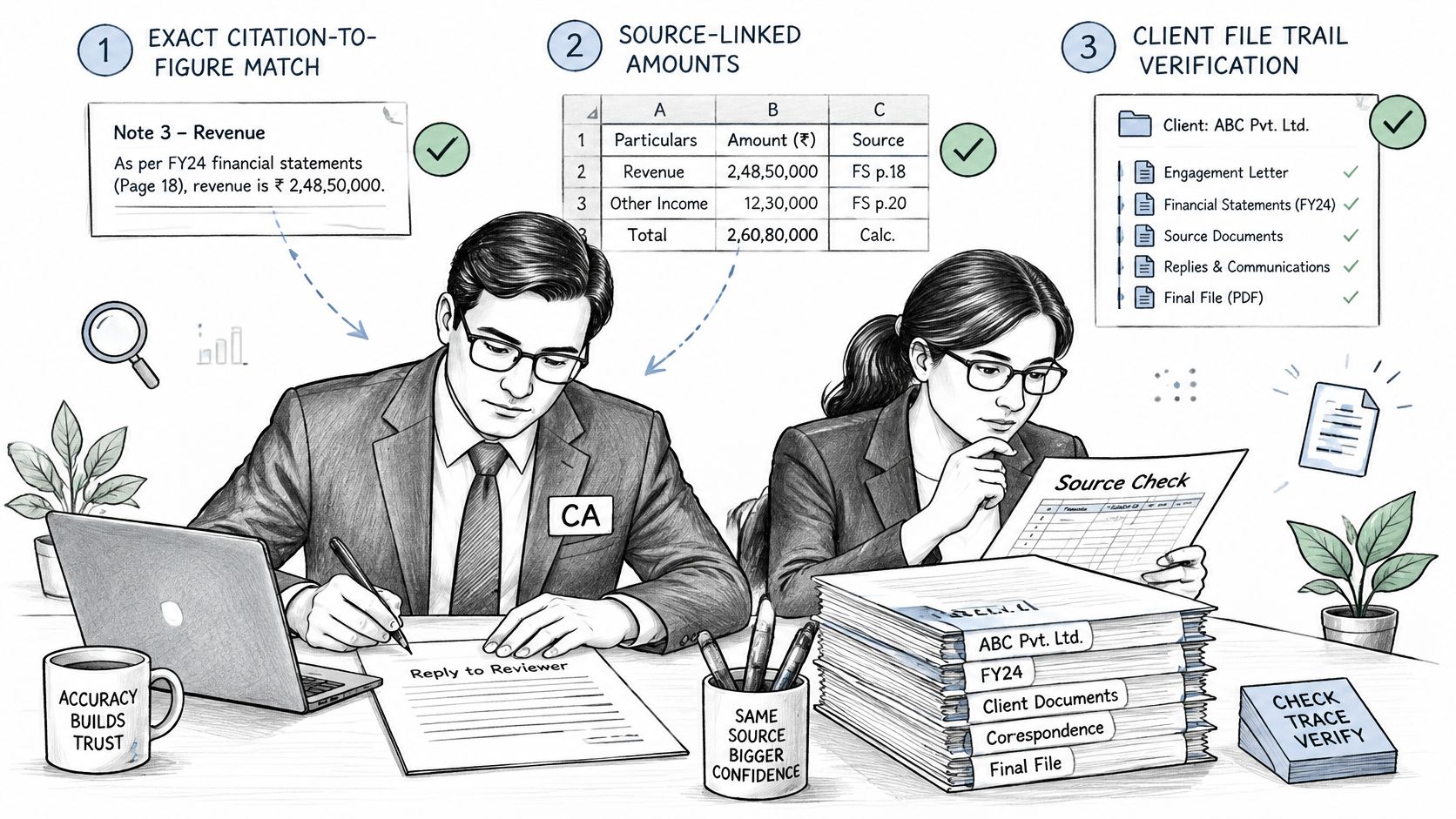
The ICAI article on AI adoption reports that, in a survey of approximately 1,100 members, 19.6% reported extensive staff training on AI tools and 23.6% reported basic training. A firm's usage rules and staff training therefore matter alongside the software. Set out which tasks staff may use AI for, which outputs need partner review, and how the supporting evidence must be retained.
A figure the reviewer cannot open is a figure the CA cannot sign.
Separate calculations from drafting
Dates, tax arithmetic and statutory checks should come from rules, while AI can help read documents and draft text. Ask for a worked example: choose a return or notice, then verify the date, calculation and legal reference against the relevant source. In our workspace, rules calculate dates and figures, and every draft cites a source the reviewer can open.
Review must also be part of the work itself, not a reminder to check the output later. A general AI chatbot leaves the team to create that review step manually; our workflow includes review. For legal timelines, check whether later developments have changed the position after the original decision, rather than relying on a citation that omits subsequent events.
For client personal data uploaded by a CA, the CA is the data fiduciary and Eden Labs is the processor, acting only on the CA's documented instructions. The privacy policy also states that client data isn't sold or used to train models for other customers. Ask how access and handling fit your firm's own client-data process, and make sure staff know which approved tools they can use.
As a practical test, request one notice draft, choose three figures in it and trace each to its source before shortlisting a suite. If your team handles bank records as part of that review, the bank reconciliation tool offers a way to check a focused workflow separately.
GST Reconciliation Exceptions and What to Do With Them
A single match percentage can make a reconciliation look complete while hiding the entries that still need staff time. A useful system tells the reviewer what failed to match, which source records were compared and what action should follow. The volume of returns, e-way bills and invoice data moving through the GST portal makes structured processing more practical than manually comparing portal downloads with books and client files.
GSTR-2B is a static statement for a tax period, so preserve a period snapshot. Later supplier amendments can affect subsequent periods, and the reviewer needs to see which version was used for the original assessment. Before matching, normalise supplier GSTIN, document number and date, taxable value, tax components, place of supply, IRN and e-way bill reference; without common formats, the same invoice can appear as two different documents in the comparison.
GSTN's 2023–24 annual report documents e-invoice data imports into GSTR-1, GSTR-2B-linked input-tax-credit workflows and bulk downloads in JSON and Excel. The National Informatics Centre's e-invoice guidance describes computer-readable invoice data and auto-population as ways to support reconciliation. Those functions make a stronger baseline than a tool that can only compare a purchase register with one portal file.
| Exception | Source of truth | Next action |
|---|---|---|
| Exact match | Books and GSTR-2B agree on GSTIN, number, date and value | Close without manual review and keep the period snapshot |
| Value or tax mismatch | Books against GSTR-2B taxable value and tax components | Check for a supplier amendment, then raise a ledger correction |
| Duplicate IRN | E-invoice IRN appears more than once | Confirm one entry before any input tax credit is taken |
| In books, absent from GSTR-2B | Purchase register against GSTR-2B | Ask the supplier to upload; hold the credit until it appears |
| In portal data, absent from books | E-invoice data against purchase register | Check for an unrecorded purchase and post it after review |
| E-invoice without matching e-way bill | IRN against e-way bill reference | Request transport documents where the movement required one |
Make every exception reviewable
Each exception should retain its source payload, the matching rule, any user override and the resulting input-tax-credit treatment. Without that record, a later reviewer sees the conclusion but not the basis for it. The same record should also carry forward when an exception moves from matching to resolution, so the staff member raising the supplier query works from the same GSTIN, values and IRN the matcher flagged rather than a re-keyed summary.
The workspace runs GSTIN and PAN checks and GSTR-2A/2B matching through rules, and estimates about 4 hours of CA time saved per GST reconciliation. Test that figure against your real volumes and review time before relying on it. For context, Deloitte India's GST@9 Survey found that 69% of surveyed Indian businesses identified compliance digitisation as GST's biggest success, while 54% cited tax-process automation (Deloitte India).
Measure invoices processed per minute, the share auto-classified, the false-match rate, exception-review time and whether corrected source files reprocess cleanly. A low exception count can mean clean data or a lenient matcher, so read it alongside the false-match rate. If a mismatch concerns input tax credit, review the notice context as well as the source documents: the GST ITC mismatch guide can help orient that review. To compare tools fairly, run one client's last quarter through each shortlist and count exceptions by class.
How to Move Bookkeeping Data Into TallyPrime
The objective is to move statements and invoices into TallyPrime without retyping vouchers. The sequence below keeps the source document attached to the accounting decision, so a fast import doesn't turn into a ledger-clean-up exercise.
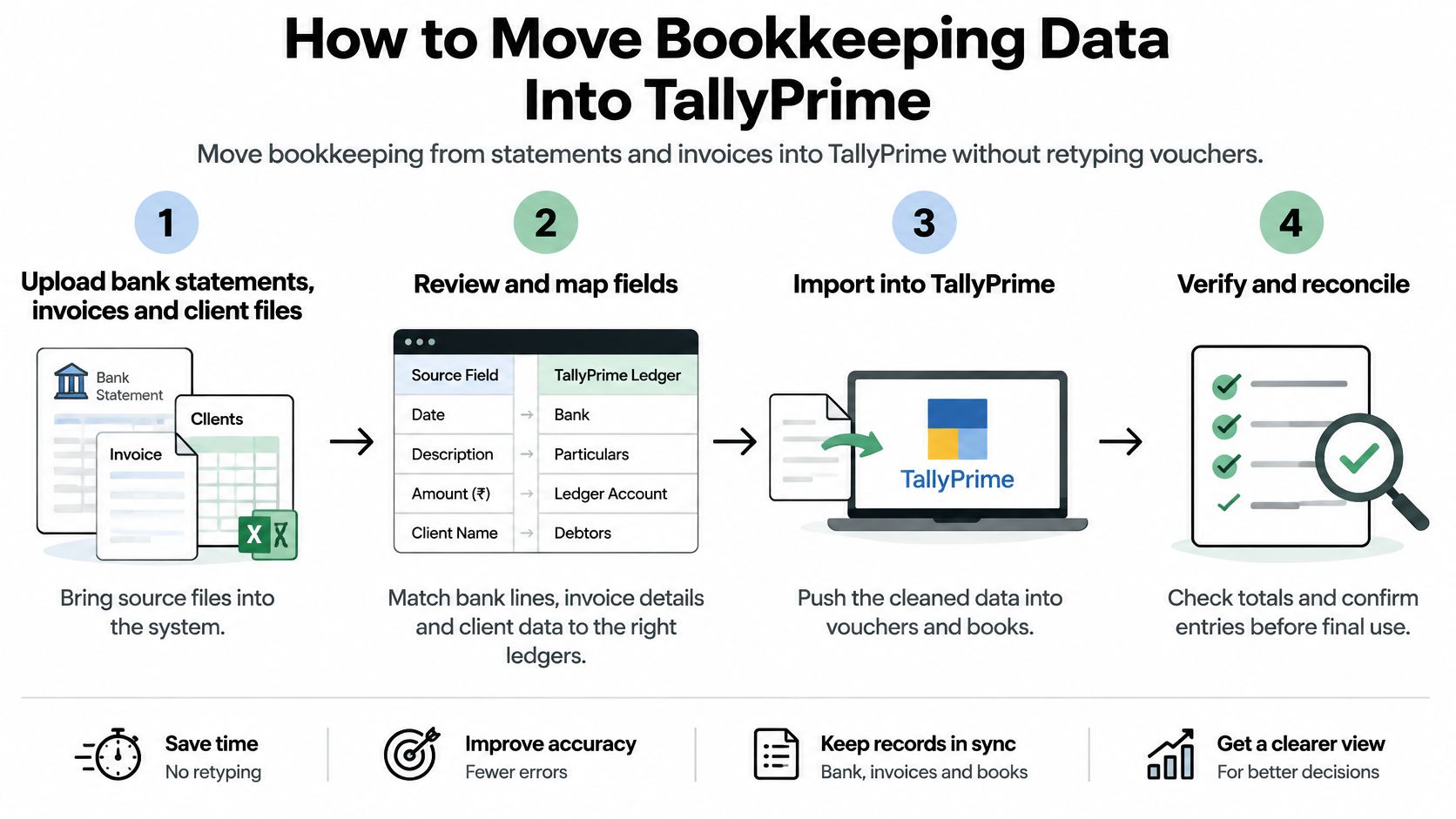
Upload the source files. Bring bank statements, invoices and client files into one client workspace, so each later step uses the same records. A common slip is saving an invoice under the wrong client or working from an older statement.
Review the suggested ledger. Compare each suggested ledger with the party master before approving it. A duplicate party under a slightly different spelling can split the transaction history and make a bulk export harder to review.
Apply posting rules. Set rules for recurring vendors and customers so routine entries can be prepared consistently. Check each rule against the correct party first, because a rule applied to the wrong vendor spreads the error across multiple entries.
Run the voucher balance check. Correct every unbalanced entry before export. Don't rely on a successful import to reveal whether the underlying voucher is sound.
Export vouchers to TallyPrime in bulk. Send approved vouchers across rather than keying them in again. Check the export mapping for each voucher type, especially where the client's ledger structure differs from your standard.
Retain reconciliation identifiers. Keep the GSTIN, IRN and reconciliation status on each exported voucher so a reviewer can trace it back to the government-originating record. An entry without those identifiers may be difficult to distinguish from a manually prepared voucher later.
Reconcile the closing balances. Compare Tally ledger totals with the bank closing balance before the period closes. Investigate timing differences and omitted entries rather than treating a small unexplained difference as harmless.
Define a clean run
A clean run has no unbalanced vouchers, an identifier on every exported line and closing balances that match the bank. Charter AI supports bank-statement and invoice ingestion, bookkeeping, reconciliation and unlimited TallyPrime export. The vendor estimates that Tally export saves about 1 hour per client a month, valued at ₹3,000 of CA time; test that estimate against your own client count and volumes.
The time saved only matters if ledger mapping and evidence survive review. Keep a sample of the source file, approved voucher and resulting Tally entry together, then check that staff can repeat the process without relying on one person's memory.
Pricing Models and What They Cost Small-Client Work
Nano and small clients can be price-sensitive even when their records generate substantial reconciliation and bookkeeping work. A deAsra GST report reports that 84% of nano enterprises use CAs for GST support and that 51% spend below ₹10,000 a year on GST accounting services; others pay ₹2,000 to ₹5,000 a month for broader accounting help. That makes per-document pricing difficult to pass on when a client sends a high volume of records.
| Pricing model | How cost scales | What to check |
|---|---|---|
| Per-document pricing | Cost rises with each statement, invoice or reconciliation | Confirm the quoted rate per document and estimate monthly volume first |
| Per-client pricing | Cost rises with every new client added | Compare against the client's own fee, which can be ₹2,000 to ₹5,000 a month |
| Unlimited bookkeeping and reconciliation with fair-usage AI tokens | Flat subscription; AI drafting and research are metered | Confirm the token allowance covers your notice and research volume |
| Add-on token pack, 2 lakh | ₹1,149 plus GST | Valid until the end of the current plan period |
| Add-on token pack, 4 lakh | ₹2,099 plus GST | Valid until the end of the current plan period |
| Add-on token pack, 8 lakh | ₹4,399 plus GST | Valid until the end of the current plan period |
| Free tools without sign-up | No charge; no AI required | Use for a one-off check of one workflow before you commit |
Price the work you actually do
For token packs, buy against measured use rather than in advance. They're valid until the end of the current plan period, so unused tokens don't carry on indefinitely. Compare your shortlist on the same basis: monthly subscription, expected document volume, client count and any AI usage that attracts a separate charge. The pricing page provides the current plan details.
Nine free tools with no sign-up and no AI offer a way to test one task before committing. They include a section finder, notice reply deadline calculator, MSME 45-day payment checker, bank reconciliation, depreciation schedule, tax audit applicability check, cash payment limit checker, trial balance to balance sheet and income tax calculator.
To compare an option with client fees, divide the monthly software cost by active clients, then compare that per-client figure with the fee each client pays. Run the calculation for your top twenty clients, using actual usage and fees rather than a firm-wide average. That will show whether the tool supports profitable service or creates a cost you can't recover.
How Different Firm Types Choose a Suite
A partner has forty GST clients and a notice due in six days. The useful question isn't which suite has the most features; it's which features will reduce pressure this week without making the reply harder to verify.
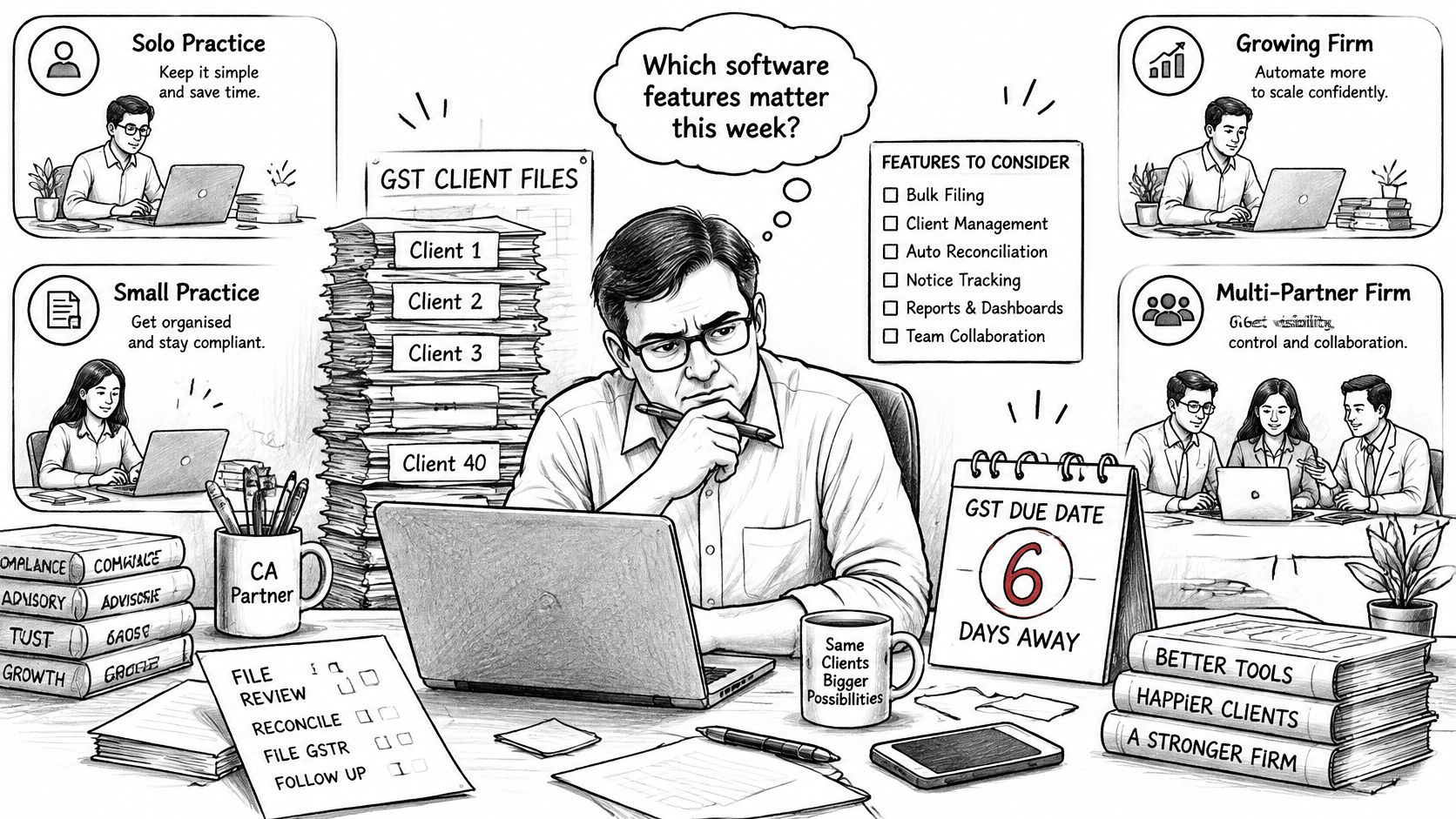
A solo or small practice should start with GST reconciliation and a compliance calendar. Those help manage repeatable work across clients, while a dedicated litigation module may be optional until notices arrive regularly. The trade-off is that the firm may still need a separate product when drafting work becomes a regular workload.
A mid-size partnership with a litigation desk should prioritise source-linked drafting, Word and PDF export, and a notice workspace. Test how a manager reviews a draft, checks its sources and records approval before filing. The trade-off is that a strong drafting workflow won't automatically solve bookkeeping or ledger-export problems.
A bookkeeping-heavy practice on TallyPrime should focus on source ingestion, suggested ledgers and bulk export. Test what happens when the same supplier appears with different spellings, or an invoice is present twice. The trade-off is that automation is only useful when staff can catch mapping errors before they reach the books.
An operations-led firm should prioritise the calendar and client document vault. Charter AI provides an unlimited calendar for every client, with GST, TDS, ITR and client deadlines, plus reminders 7 days before, 1 day before and on the day. Confirm that registration types populate the required dates and that reminders reach the staff responsible for each task. The trade-off is that deadline visibility won't replace a clear owner for resolving a missed or incomplete item.
Partners judge verification and review; staff judge daily speed and the number of manual steps. A long feature list can still be a poor fit if your team uses only two modules each day.
A short product walkthrough can help your team see whether day-to-day work fits the process. Watch it after you've identified the workflows you want to test.
Before looking at the final decision, assign your firm to one of these four types. If it sits between two, choose the one that reflects where staff spend the most time, then test the other type's most important workflow as a secondary requirement.
Choose the Suite That Fits Your Firm This Quarter
A suite earns its place when it carries data cleanly between workflows and lets you trace every output back to a source a CA can check. Test that this quarter, at a known cost, before any locked price or polished demo makes the decision for you.
- Filter by hours. Take the two or three workflows that consume the most partner and staff time, then use them to screen every suite on your list.
- Score the handoffs. Record separate results for source tracing, exception handling, Tally export and data terms. One overall score can hide a serious weakness in a workflow you depend on.
- Check the economics. Use your active client count and the pricing comparison to calculate monthly software cost per client, then compare it with each client's fee.
Charter AI's annual plan is open to the next 21 CAs and firms at a price locked forever, with no increase at renewal, every update included and a 7-day money-back guarantee. That offer does not replace the workflow tests. A firm that wants drafting, research, bookkeeping, GST and compliance in one workspace may find the fit useful. A practice that needs only one of those jobs may find a narrower tool cheaper.
Run one client's full cycle through your shortlist this week. Record the hours saved and exceptions found, and choose the annual plan only after reviewing the results.
Charter AI brings notice drafting, source-linked research, bookkeeping, GST reconciliation, TallyPrime export and compliance management into one workspace for Indian CA firms. Visit Charter AI to compare its workflows against your firm's review, reconciliation and handoff requirements.
Tags
Related guides
- How do I reconcile GSTR-2B against my purchase register step by step?
- Why does my GSTR-2B not match my purchase register: what are the common root causes?
- My invoice number format doesn't match what the supplier filed: will Tally still match it?
- How do I import the GSTR-2B JSON file into Tally Prime?
- How do I reconcile GSTR-2A/2B in Zoho Books?