
GST Software for Chartered Accountants: 2026 Buyer's Guide
Compare GST software for chartered accountants on reconciliation at scale, notice handling, source traceability, client workspaces and integrations.
Published 17 min read
The popular advice is to buy the GST software for chartered accountants that matches the most invoices, the fastest. That's the wrong test. Matching is table stakes. What hurts a firm is a figure that looked right at review, then changed on the portal, with no record of who accepted what, when, or why. I would judge every product by whether a partner can still defend that figure months later.
Table of Contents
- Why CA Firms Now Need a GST Control Layer
- Five Criteria for Scoring GST Software
- How to Score Without Fooling Yourself
- Reconciliation at Scale Across GSTR-2B and E-Invoices
- What Each IMS Action Must Leave Behind
- The Output Fields a Reviewer Actually Needs
- Notice Replies Built on Traceable Sources
- Test the Draft Before You Trust the Demo
- Client Approvals, Deadlines and Audit Trails
- Controls to Test in the Workspace
- Tally Integration and Export Paths to Test
- Integration Checks That Expose Weak Exports
- Choose Your Shortlist by Firm Situation
- Run a Pilot That Can Fail
- Price the Whole Workflow, Not the Headline Plan
Why CA Firms Now Need a GST Control Layer
The GST system's eight-year statistical report records 1,30,46,87,246 e-way bills generated between 1 April 2024 and 31 March 2025, followed by another 24,19,18,362 during April to May 2025, and 9,89,926 e-invoice generators in May and 9,92,314 in June. At that volume, GST work isn't periodic return filing. It's continuous control over registrations, returns, collections, invoices, e-way bills, ledgers and evidence.
Three workloads break first under manual handling. Month-end matching strains GST specialists who own reconciliation across dozens of registers. Notice replies strain litigation teams who start from a blank page and rebuild facts under deadline. Client document trails strain partners who sign off and must reconstruct a decision long after bookkeepers entered the data.
Say a 60-client practice closes a month in spreadsheets. Each client brings a purchase register, portal downloads in different formats, and staff notes in email. Hours go into re-sorting, formula checks and chasing versions, not into deciding disputed ITC. Errors hide in copied rows and amended invoices nobody re-checked.
That's the shift. You don't need a faster return-preparation utility. You need a data-control layer that connects the sources, queues the exceptions and preserves why each conclusion was reached. Speed matters, but reviewability after the data changes is the stricter test.
Five Criteria for Scoring GST Software
Copy this scorecard into your own comparison and score every demo against live client files, not vendor samples.
| Criterion | What to verify | Red flag |
|---|---|---|
| Reconciliation at scale | Matches invoice key, supplier GSTIN and document number across GSTR-2B, e-invoices and e-way bills, with exceptions queued | Per-client upload caps or row-by-row manual review |
| Notice handling | Drafts reference annexure numbers and line items, and capture DIN and RFN from the notice | Generic templates with no link to uploaded documents |
| Source traceability | Every figure and citation opens to the exact PDF page or official text, with dates on amended positions | Citations with no link, or figures that cannot be traced |
| Client workspaces | Separate document vault per client, role-based access, encryption and an approval history | One shared folder for all clients with no change log |
| Integration | Tally voucher export, Excel exports and portal file import, with no manual retyping | Export only as PDF, or re-keying vouchers into Tally |
How to Score Without Fooling Yourself
A red flag on any row removes the product from the shortlist. Don't let a polished dashboard compensate for untraceable figures. Once every survivor clears the red flags, the relative strength of the rows decides the order for your firm.
Scoring rule: If your team has to rebuild the evidence outside the software, the software hasn't finished the job.
Then apply the deciding principle. Statutory arithmetic and checks should run on fixed rules. Due dates, GSTIN and PAN validation, voucher balance checks, GSTR-2A and 2B matching and tax audit checks shouldn't depend on generated text. AI should read documents and draft words. Any product that lets AI do the arithmetic should be marked down on every row.
We state that split plainly in our own product. Numbers come from rules, AI handles reading and drafting, and users can check positions against the CGST Rules 2017 text. Our rules cover statutory due dates, GSTIN and PAN checks, voucher balance checks, GST 2A/2B matching, tax audit checks covering cash, TDS, 43B, PF/ESI, related parties and ratios, all nine free tools and every Excel export. Ask every vendor to show you that boundary in the interface, not in a slide.
Reconciliation at Scale Across GSTR-2B and E-Invoices
A purchase register compared with GSTR-2A is no longer the whole job. The portal workflow is stateful, and your reconciliation has to preserve those states.
The flow below shows why portal status, not file matching alone, decides the ITC outcome.
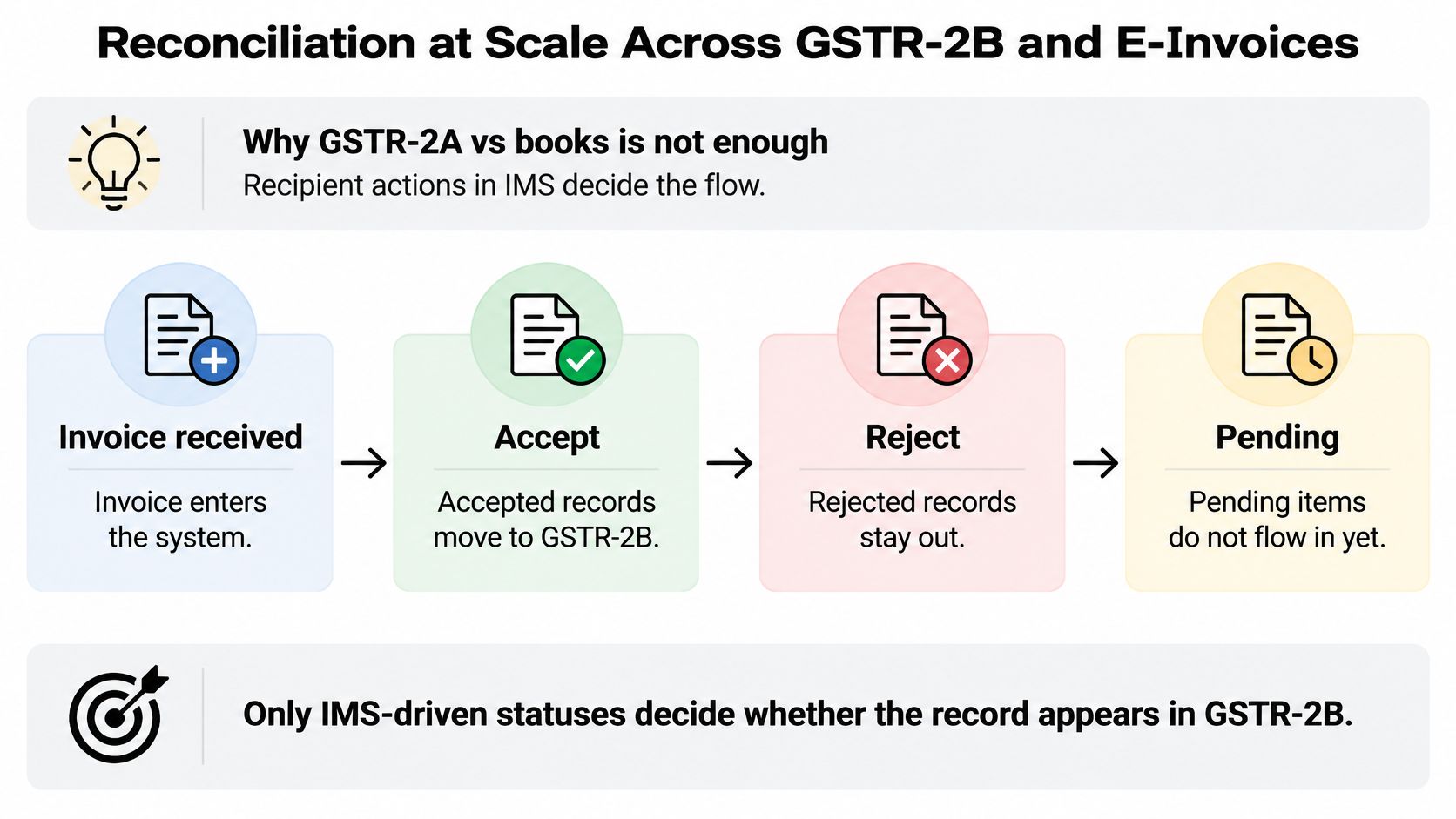
GSTN states in its returns user guide material that recipient actions in the Invoice Management System (IMS), accept, reject or pending, directly determine whether records enter the respective GSTR-2B sections and whether input tax credit auto-populates into GSTR-3B, and that GSTR-2B continues to be generated on the 14th of each month. Treat the 14th as your monthly control point, not as an incidental download date.
What Each IMS Action Must Leave Behind
| IMS action | Effect on GSTR-2B | ITC in GSTR-3B | What the software must store |
|---|---|---|---|
| Accept | Record appears in the relevant GSTR-2B section | Available ITC auto-populates | Action date, user, invoice key and amendment state |
| Reject | Record does not count toward ITC | Does not flow into GSTR-3B | Rejection reason, supplier follow-up and reversal trail |
| Pending | Record stays excluded until action is taken | Not available until accepted | Pending age, reminder date and owner |
| Deemed accepted | Treated as accepted under the portal rule | Flows as accepted | Window date and the rule version applied |
Accepted records become available ITC. Rejected records don't flow into GSTR-3B. Pending records remain excluded until someone acts. If your software flattens that into matched or missing, your reviewer loses the actual decision that drives the return.
The Output Fields a Reviewer Actually Needs
A usable reconciliation output carries invoice key, supplier GSTIN, document number and date, taxable value, tax components, amendment state, IMS action and downstream ITC treatment on every row. It also distinguishes accepted from deemed-accepted records, preserves supplier amendments, and supports recomputation when an action changes after draft GSTR-2B generation.
- Invoice key: the stable identity your team can trace across register, portal and books.
- Amendment state: whether you're looking at the original supplier record or a later version.
- ITC treatment: the consequence of the IMS action, written next to the row, not inferred later.
Say a client has 1,200 purchase invoices in a month. In a worked example, 1,140 match cleanly, 38 have tax component differences, and 22 are missing from GSTR-2B. A weak tool still makes a reviewer scroll 1,200 rows. A workable one clears the 1,140 and puts only the 60 exceptions in a queue, split by reason, owner and supplier follow-up. That's where senior time should go.
E-invoices and e-way bills belong in the same check, not in a separate spreadsheet ritual. A sales invoice that agrees with GSTR-1 but not with the e-way bill still creates a question a partner may face later. We offer unlimited reconciliation for GSTR-2B, e-invoices and e-way bills, because per-document caps push teams back into partial checks exactly when volume rises.
We also estimate that GSTR-2B reconciliation against the purchase register saves about 4 hours per run, roughly ₹4,000 of CA time at ₹1,000 an hour. Treat that as our vendor estimate and test it against your own timed pilot. The more important measure is whether the exception history survives after filing.
Notice Replies Built on Traceable Sources
A fluent draft isn't a reliable draft. In notice work, polish can hide a wrong annexure reference, an untraceable figure or a citation that doesn't support the sentence it decorates.
The image below reflects the practical starting point, a structured reply built from the notice and its supporting documents, not from memory.
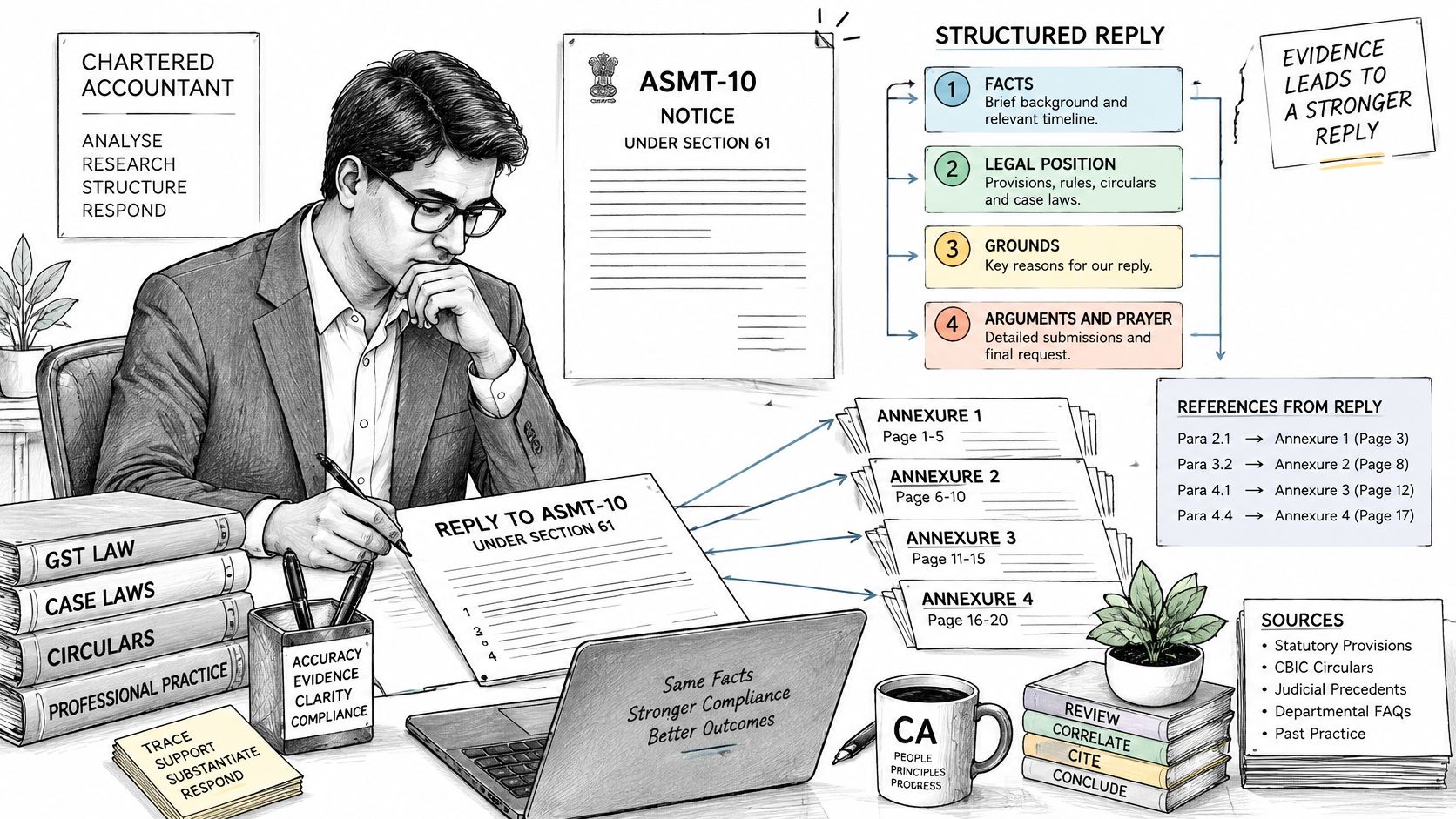
Take an ASMT-10 under section 61 as the test case. A serious reply carries facts, legal position, grounds, arguments and prayer, and it answers the department on the annexure numbers and line items the department cited. Generic paragraphs about bona fide conduct don't address a line-level discrepancy.
Capture the DIN and RFN from the notice and keep them with the draft, the uploads and the filing record. Without those identifiers tied to the workspace, staff waste time proving which draft belongs to which portal proceeding. The same discipline applies when you're handling a GST ITC mismatch intimation under Rule 88D in DRC-01C, where the mismatch rows and the reply must stay connected.
Test the Draft Before You Trust the Demo
Run this test on any product using a real, closed notice from your own files.
- Upload the notice and registers: Use the messy PDFs and Excel files your team receives.
- Open ten citations at random: Each one should land on the exact judgment, circular or statute passage relied upon.
- Recompute three figures: Trace each amount back to a row in the uploaded PDF or register and into the reconciliation.
- Check amendment notes: Where a later amendment changed the position after a decision, the draft should show that date and effect.
If a citation opens nowhere, stop. If a figure can't be recomputed, stop. Fluency has failed the only test that matters in front of an officer.
This short walkthrough is useful only if you pause it at the citation and figure checks and ask whether your own team could repeat them on a live file.
Review also needs to be visible. Our workflow has review built in, while a general AI chatbot requires manual review outside the tool and leaves no dependable record of who checked what. In our approach, AI does not do arithmetic or checks in bookkeeping. Due dates, GSTIN and PAN checks, voucher balance checks, GST 2A/2B matching, tax audit checks and free tools run on fixed rules, with every limit, rate and due date showing its source and the date last reviewed.
A partner should sign the facts, the recomputed figures, the current legal position and the annexure-wise response. Not the tone.
Before filing, I would have the reviewing partner confirm four things: every department line has an answer, every amount traces to source, every citation opens and remains current, and the prayer follows from the grounds. Anything less is drafting assistance, not notice handling.
Client Approvals, Deadlines and Audit Trails
A vendor invoice clears review on the 18th. On the 22nd, a late supplier filing drops it out of GSTR-2B. If the software can't show who approved the original ITC position and what changed afterwards, that difference lands on the reviewing partner, not on the tool.
Each client needs a separate document vault with search, encryption, role-based access and an approval history. A shared drive folder named by client isn't a workspace. It can't show who saw a register, who approved an ITC position, or which version supported the filed return.
The GST Council newsletter for April reports about 1.65 crore registered taxpayers by May 2026, more than 3,000 crore invoices and over 800 crore e-way bills captured in the reported period, and describes the Invoice Management System as introduced from the October 2024 tax period. Scale alone doesn't create risk. Unrecorded state changes do.
Controls to Test in the Workspace
Higher automation shifts risk from data-entry errors to unnoticed portal-state changes and premature acceptance of disputed ITC. Test these controls directly:
- Exception prioritisation: disputed, high-value and ageing pending items surface before routine differences.
- Client approval trail: the named approver, timestamp and ITC position approved are stored together.
- Period-locking: filed periods can't be overwritten by a later import.
- Reversal or reclaim logic: a status change after review creates a clear next action rather than changing a total the partner already signed.
- Evidence link: each ITC conclusion opens to the source invoice, portal status and reviewer.
That last pair is where demo-ready tools fail. Matching volume looks impressive in a sales call. The question that matters is whether a figure stays defensible after the portal moves under it.
Deadlines need the same per-client logic. GST and TDS dates depend on registration type, so a monthly filer and a quarterly filer shouldn't share one undifferentiated calendar. Our compliance calendar shows GSTR-3B and TDS due dates, lets users set a client's registration type to add GST dates, sends a daily digest, and allows tasks to be marked done with undo. The monthly GSTR-3B due date reference shows how that date logic applies to a single return.
A daily digest helps only if the underlying status is trustworthy. Mark-done with undo matters because shared calendars get clicked in error during filing week. The audit trail should preserve the correction, not pretend it never happened.
Tally Integration and Export Paths to Test
Follow one transaction from source to ledger. Bank statements, sales and purchase registers and invoices should become vouchers without staff retyping the same row in three places. At ingestion, the software suggests a ledger for each bank row. Rows that match a clear rule can auto-post. Rows that don't should wait for manual approval. Only approved vouchers should export to TallyPrime.
That's the path we use. Our bookkeeping imports bank statements, suggests ledgers for each row, auto-posts rule-matched rows, and allows manual approval of waiting rows before exporting to Tally. The approval step is not friction. It's the point where a bookkeeper stops a wrong ledger from becoming a month of wrong reports.
Integration Checks That Expose Weak Exports
- Ledger name mapping: names must map to the client's actual TallyPrime chart, including spelling and grouping differences.
- GST and TDS ledger mapping: tax ledgers must land separately and consistently, not inside a generic expense head.
- Duplicate detection: re-importing the same file shouldn't create a second set of vouchers.
- Voucher balance check: debit and credit must agree before export, with the failing row identified.
- Clean re-export: editing one ledger and exporting again shouldn't duplicate the untouched vouchers.
Run a four-step test on a trial company before you discuss price.
- Export one month: Send a complete month of approved vouchers into a test TallyPrime company.
- Reopen and inspect: Open the company and check ledger placement, tax splits and narrations.
- Compare totals: Match voucher count and totals against the source register, line by line where they differ.
- Edit and re-export: Change one ledger, export again, and confirm that no duplicates appear.
Then ask direct operational questions. Are exports unlimited? How are rejected rows shown and corrected? Do Excel exports carry the same fields as the Tally file, so your reviewer can check the same data outside Tally? Can an existing client's Tally ledgers and registers be imported without re-keying? Who performs the first ledger mapping, how long does setup take per client, and what support response is promised during a filing week?
I would not accept a demonstration on a vendor-created company with perfect ledger names. Use one real client's chart, with its abbreviations and legacy heads. Integration fails in those details, not in the export button.
Choose Your Shortlist by Firm Situation
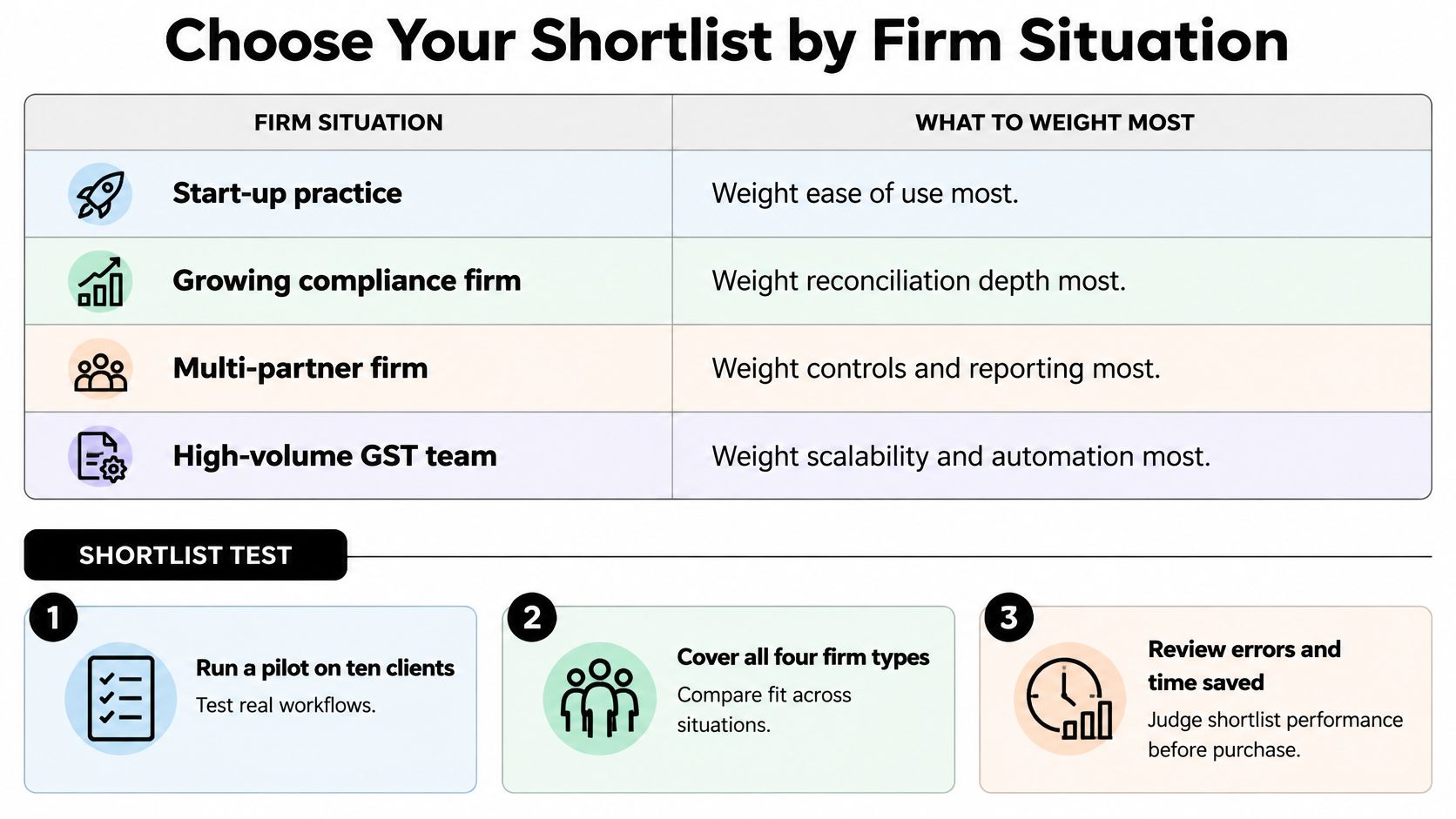
Start with the situation your firm is in, then weight the scorecard accordingly.
| Firm situation | Criteria to weight most | Shortlist test |
|---|---|---|
| Mid-size firm with a bookkeeping team | Unlimited reconciliation, bulk ingestion and client workspaces | Time one full month of reconciliation across ten clients and count exceptions left open |
| Litigation and notices team | Source traceability, drafting quality and deadline tracking | Draft one real notice reply and run the traceability test |
| Multi-branch firm with several partners | Role-based access, period-locking and audit trail | Test permissions for each role and review the change history for one client |
| Solo or small practice with partner-led review | Low monthly cost per client, a fast exception queue and a shared client calendar | Run one month for three clients and time the partner sign-off |
The checklist below keeps the choice tied to firm situation and pilot evidence, rather than to the length of a feature list.
Run a Pilot That Can Fail
Choose ten clients spanning the situations above. Include one reconciliation-heavy trader, one notice-prone client, one multi-location client and smaller files where the partner still reviews everything. A pilot built only on clean, low-volume clients will tell you almost nothing.
- Run one full month of reconciliation: Log every exception the tool raises and every item your team clears by hand.
- Draft one notice-style reply: Open citations, recompute figures and check annexure references against the source files.
- Time each step: Record ingestion, exception review, export and partner sign-off against your manual baseline.
- Score against the scorecard: Treat any red flag as an immediate exit, even if the total score looks respectable.
Pay attention to the exceptions the tool misses. A short queue is valuable only if it's complete. If staff keep a side spreadsheet for supplier follow-ups, amendments or disputed ITC, write that down as product failure, not as team habit.
Price the Whole Workflow, Not the Headline Plan
Compare total cost per client per month. Include add-on packs, export limits, per-document charges and any extra cost for additional users or branches. A cheaper plan that caps reconciliation can become the expensive option once your team returns to spreadsheets for the overflow.
Check whether reconciliation, bookkeeping and Tally export are unlimited on the plan you're buying. On every one of our plans, bookkeeping, GST reconciliation and Tally export are unlimited. Price AI drafting packs separately from those rules-based workflows, because they solve different work and should not be blurred into one vague usage limit.
Choose the product whose exception queue your team clears fastest and whose audit trail a partner would sign without rebuilding it.
That's the verdict rule I would use. Don't buy for the demo, and don't buy because a vendor calls a feature AI powered. Buy the GST Software for Chartered Accountants that keeps status changes, approvals, figures and citations reviewable under month-end pressure. Run the pilot on one live client this week. Record the time saved, the exceptions missed and the questions your partner still had to ask outside the software.
Run your pilot where the evidence stays attached to the work. Charter AI combines unlimited GST reconciliation, bookkeeping, TallyPrime export, client workspaces, a compliance calendar and source-linked notice drafting in one workspace for Indian CA firms. Start with one live client this week, time the exception queue, open the citations, and keep the product only if a partner would sign its audit trail.
Tags
Related guides
- How do I reconcile GSTR-2B against my purchase register step by step?
- Why does my GSTR-2B not match my purchase register: what are the common root causes?
- My invoice number format doesn't match what the supplier filed: will Tally still match it?
- How do I import the GSTR-2B JSON file into Tally Prime?
- How do I reconcile GSTR-2A/2B in Zoho Books?