# Sales Return in Tally: A Practical Recording Walkthrough
Record a sales return in Tally step by step, from voucher creation to GSTR-1 reconciliation, with sample entries and version-specific tips.
Published 15 Oct 2026. 13 min read.
You're usually dealing with this at the worst possible time. The sales invoice is already booked, GST is sitting in the output ledger, the customer has sent back goods, and someone in accounts wants a quick fix that “just clears it.” That's exactly where **sales return in Tally** goes wrong if the team treats it like a negative sale instead of a linked **credit note**.
The correct entry is less about speed and more about preserving the trail. A sales return has to sit against the **original invoice**, reverse the right tax ledgers, and flow into **GSTR-1** in a form the GST records can recognise. If you break that chain, the voucher may save, but the month-end reconciliation usually won't.
## Table of Contents
- [Why a Credit Note Is the Heart of a Sales Return in Tally](#why-a-credit-note-is-the-heart-of-a-sales-return-in-tally)
- [TallyPrime Versus TallyERP 9 Choosing the Right Workflow](#tallyprime-versus-tallyerp-9-choosing-the-right-workflow)
- [The version check that saves the most time](#the-version-check-that-saves-the-most-time)
- [Recording a Sales Return in TallyPrime Step by Step](#recording-a-sales-return-in-tallyprime-step-by-step)
- [Recording a Sales Return in TallyERP 9 With Agst Ref and New Reference](#recording-a-sales-return-in-tallyerp-9-with-agst-ref-and-new-reference)
- [Choosing CGST, SGST or IGST Ledgers Without Triggering a Spot Assessment](#choosing-cgst-sgst-or-igst-ledgers-without-triggering-a-spot-assessment)
- [The Four-Check Month-End Reconciliation Loop](#the-four-check-month-end-reconciliation-loop)
- [The controls that catch most misses](#the-controls-that-catch-most-misses)
- [Closing Notes From One CA Desk to Another](#closing-notes-from-one-ca-desk-to-another)
## Why a Credit Note Is the Heart of a Sales Return in Tally
A returned shipment is not a standalone accounting event. It is the reversal of a specific sale, with the original invoice still doing the heavy lifting for audit, tax, and customer settlement. In Tally, that's why a **credit note** sits at the centre of the process, not a journal voucher or an unreferenced negative entry.
The practical reason is simple. A negative sales line may reduce revenue on paper, but it doesn't preserve the invoice link or give GST the right trail for the taxable-value reduction. A proper credit note reduces the customer's receivable, reverses the relevant sales and tax amounts, and keeps the return tied to the original sale in a way that survives review.
The same logic matters on the customer side. Where applicable, the recipient's input-tax credit reduction has to mirror the supplier's adjustment, so the note can't float free of the original supply. That's why the credit note is the only entry type that really belongs at the centre of a **sales return in Tally**.
> **Practical rule:** if the return doesn't point back to the invoice, the month-end review gets harder than it needs to be.
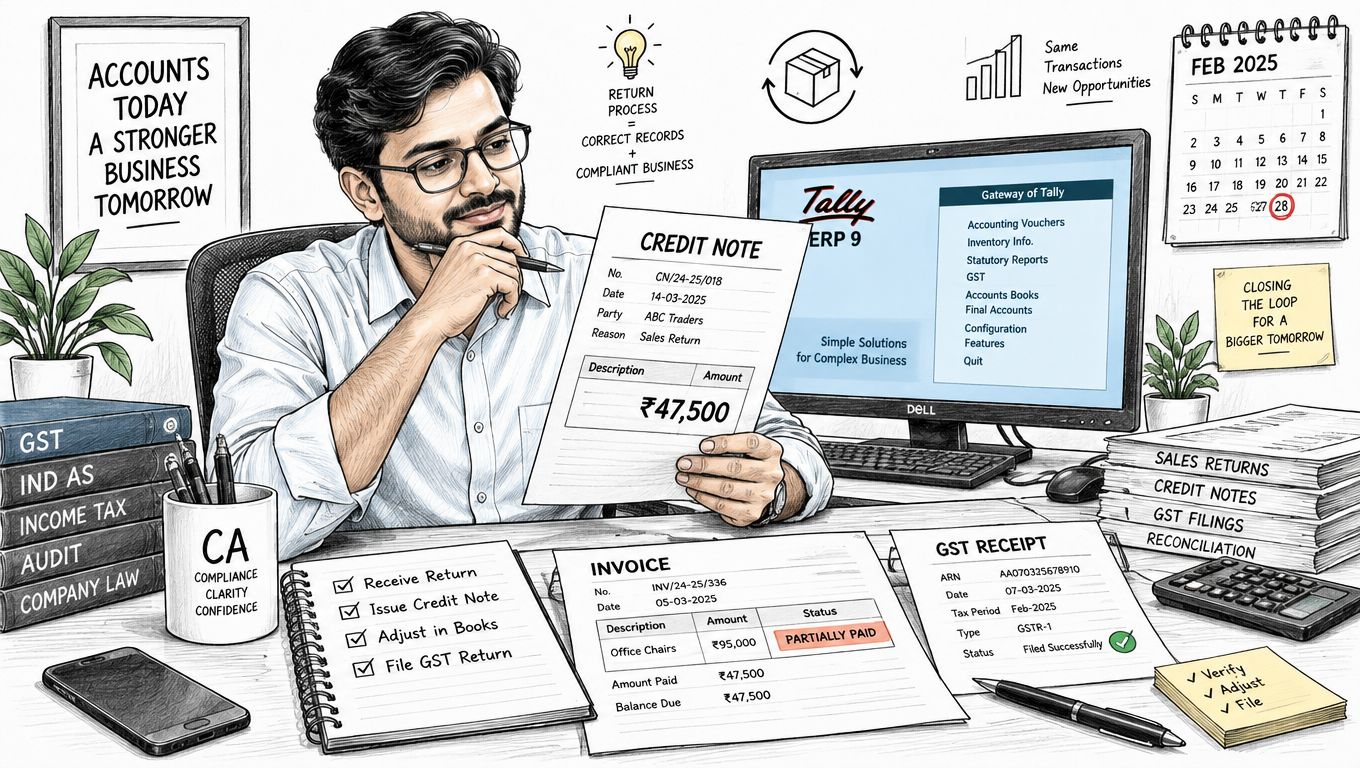
Under GST, the credit-note trail also controls reporting. Tally's India guidance links the outward-supply credit note to **Table 8 of GSTR-1**, which is why the return must stay connected to the original invoice rather than becoming a loose reversal entry. For filing rhythm and due-date discipline, keep the monthly return calendar handy, including the GSTR-1 cycle described in the [monthly GSTR-1 due-date reference](https://charterai.in/due-dates/gst-gstr1-monthly).
## TallyPrime Versus TallyERP 9 Choosing the Right Workflow
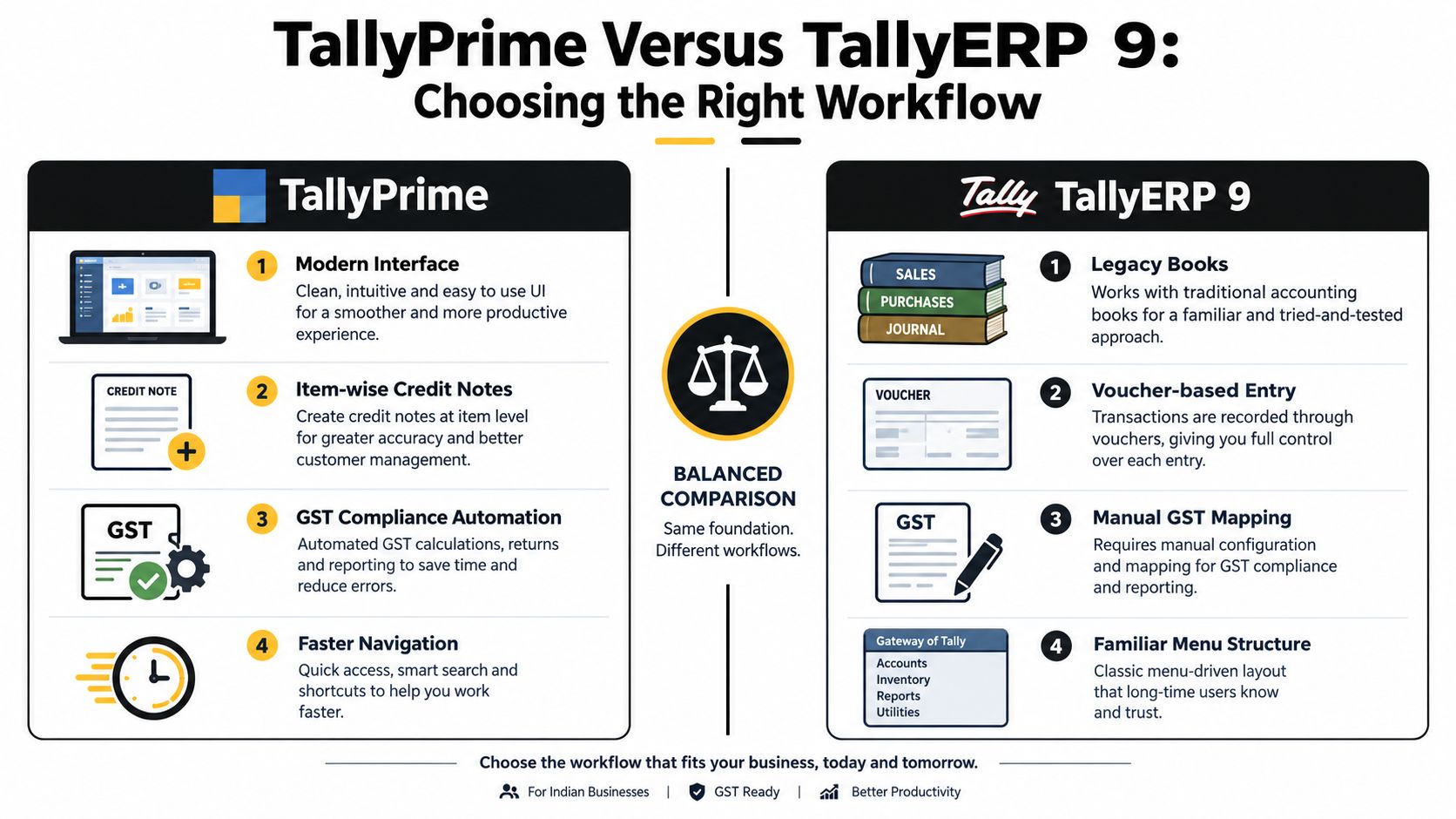
Mixed environments cause more avoidable errors than bad tax logic does. One client sits on **TallyPrime**, another still runs **TallyERP 9**, and the assistant uses the wrong screens because both systems look “close enough” at first glance. They're not close enough when you need the credit note to appear in the right GST section.
In **TallyPrime**, the clean route is **Go To > Create Voucher > Other Vouchers > Credit Note**, then switch to **Item Invoice** mode when goods are physically returned. In **TallyERP 9**, the workflow sits under **Accounting Vouchers > Credit Note**, with the older bill-reference handling that many teams still use for settlement status. The menu label matters because the GST details panel, the buyer-return reason field, and the reference treatment don't sit in quite the same place across the two versions.
### The version check that saves the most time
The first control is not the voucher, it's the installation. If the company is on **TallyPrime**, follow the item-wise route and expect the modern Go To navigation. If it's **TallyERP 9**, stay inside the older accounting-voucher path and handle the reference treatment explicitly. Picking the wrong path is one of the fastest ways to create a saved voucher that never behaves properly in **GSTR-1**.
> Open the right version first, then open the voucher. That order prevents most of the avoidable cleanup later.
The other reason this split matters is classification. TallyPrime's practical workflow is built around the item invoice and GST details entry, while ERP 9 users often rely more heavily on whether the bill is adjusted **against reference** or parked as a fresh reference for later settlement. If you've got a mixed client base, don't memorise one path and force it everywhere. Match the installed version, then enter the return exactly where that version expects it.
## Recording a Sales Return in TallyPrime Step by Step
Start with the original paperwork in front of you, not just the returned goods. In TallyPrime, open **Go To**, choose **Create Voucher**, and pick **Credit Note** under **Other Vouchers**. Switch to **Item Invoice** mode, because a physical return needs item-level reversal, not a bare ledger adjustment.
Now select the original buyer from the ledger list and enter the original invoice reference. That reference is what keeps the return anchored to the sale that occurred. Then pick the sales ledger, re-enter the returned stock item, and match the quantity and rate to the goods coming back.
A simple example helps. Suppose **ABC Traders** returns **50 units of SKU X at Rs 950 each** from an intra-state sale. In that case, the credit note should use the original buyer, original invoice number, returned quantity, and the same tax structure that applied to the sale. Tally's GST guidance specifically expects the note to preserve the invoice trail and the taxable-value reduction, not recreate the return as a free-floating negative entry.
Before saving, stop at three checkpoints.
- **Original invoice number and date:** confirm both before you post anything.
- **Returned quantity versus inward record:** match the physical return to what came back into stock.
- **Correct tax ledgers:** use **CGST plus SGST** for intra-state supplies, or **IGST** for inter-state supplies.

After that, enable **GST details**, choose the **buyer-return reason**, and save the voucher. The credit note then surfaces in the relevant **GSTR-1 credit and debit note** section, which is the point of the exercise. If the note doesn't show up there, the entry might still have saved, but it hasn't yet earned its place in the return workflow.
A small but important habit helps here. Keep the narration blunt and specific, something like a sales return against the original invoice for the buyer, quantity, and reason. Vague narrations waste time later when someone is scanning old vouchers during review.
The following recording sequence is often enough to keep the workflow tight.
1. Open the credit note voucher.
2. Choose the original buyer.
3. Enter the invoice reference.
4. Re-enter the returned item and quantity.
5. Apply the correct GST ledgers.
6. Save only after checking the return reason.
## Recording a Sales Return in TallyERP 9 With Agst Ref and New Reference
ERP 9 still comes up often in legacy files, and the settlement logic deserves more attention there. Open **Accounting Vouchers > Credit Note**, then enable the GST detail section and enter the original invoice particulars. The critical difference is the reference treatment, because ERP 9 makes you think more deliberately about whether the bill is still open or already settled.
Use **Agst Ref** when the original invoice is unpaid. That lets the credit note adjust the outstanding bill directly, which is the cleanest way to reduce the debtor balance when money hasn't changed hands yet. This is also the setup that keeps customer ageing meaningful.
If the invoice has already been paid, don't force the same treatment just because the voucher allows it. Record the note as a **new reference** and settle it separately, rather than automatically netting an open receivable that no longer exists. That keeps the customer ledger honest and avoids distorting ageing reports.
> A paid bill needs settlement review, not an automatic open-item reversal.
For an unpaid invoice, the result is straightforward. The note reduces what the customer still owes, and the link to the original bill remains visible. For a paid invoice, the return still needs a credit note, but the accounting follow-up belongs in settlement, not in pretending the invoice was still live.
Use a quick ERP 9 checklist before you save.
- **Original invoice number:** capture it exactly as issued.
- **Return reason:** enter a clear, supportable reason.
- **Tax ledgers:** choose the same GST pattern as the original sale.
- **Reference type:** decide between **Agst Ref** and **New Reference** based on settlement status.
That distinction matters more than people expect. The wrong reference type doesn't just clutter the voucher, it also changes how the customer's outstanding balance reads in the books. In a busy practice, that is usually where the first reconciliation complaint starts.
## Choosing CGST, SGST or IGST Ledgers Without Triggering a Spot Assessment
Tax-ledger selection is where a clean return can turn messy fast. If the original sale was **intra-state**, the credit note needs to reverse **CGST plus SGST**. If it was **inter-state**, the note must reverse **IGST** alone. Anything else creates a mismatch between the return voucher and the sale that spawned it.
A quick check before saving saves trouble later.
| Supply Type | Original Tax Pair | Credit Note Ledgers | Reversal Amount on Rs 1,00,000 Return |
|---|---|---|---|
| Intra-State | CGST + SGST | CGST + SGST | Rs 9,000 CGST and Rs 9,000 SGST |
| Inter-State | IGST | IGST | Rs 18,000 IGST |
The place of supply drives the choice, so don't guess from where the buyer sits on the day of return. Use the original supply classification, match the HSN code and rate to the invoice, and keep the tax structure consistent. If the credit note uses a different rate, the arithmetic may still look neat inside Tally, but the GST trail will no longer line up cleanly with the original transaction.
The legal timeline matters too. The supplier has to declare credit-note details in the return for the month of issue, subject to the statutory outer deadline, **September following the end of the relevant financial year or the date of filing the annual return, whichever is earlier**, as set out in the [CGST Act, 2017 reference](https://charterai.in/law/cgst-act-2017). GST records must also be retained for **72 months** from the due date of the annual return for the relevant year, and the GST Council's note on [credit notes under GST](https://gstcouncil.gov.in/sites/default/files/e-version-gst-flyers/Credit%20Note%20under%20GST.pdf) supports that timeline.
Keep the paper trail with the voucher. The return is not just a tax entry, it is part of the compliance file. Match the original tax pattern, check the place of supply, and keep the credit note tied to the invoice it reduces. That is the line that holds up best when a return gets reviewed later.
## The Four-Check Month-End Reconciliation Loop
A credit note that saves cleanly can still fail at month end. The control is not the button click, it's the reconciliation loop around it. In practice, I trust four checks far more than I trust a saved voucher on its own.
First, match the credit note to the original invoice number and the returned quantity. If the reference is wrong, the return loses its anchor. Second, confirm the taxable value and the CGST, SGST, or IGST arithmetic so the reduction equals the goods returned.
### The controls that catch most misses
Third, verify that the note is classified correctly in **Tally's GSTR-1 report**. Tally does auto-capture and classify outward-supply data for export, but that doesn't replace a human review. Fourth, reconcile the exported GSTR-1 data against the GST portal and the recipient's books, because that's where the three-way mismatch usually surfaces.
The risk is usually one of timing or typing. A credit note dated in a different return period can land outside the team's expectation, and a mistyped invoice number can make a good voucher look disconnected from the sale. Once that happens, Tally, the filed return, and the recipient's books stop telling the same story.
> **Best practice:** review the voucher, the return report, and the recipient's record as one control set, not as three separate chores.
A short desk checklist works well here.
- **Invoice match:** original invoice number and date.
- **Quantity check:** returned stock against inward record.
- **Tax check:** taxable value and GST arithmetic.
- **Return check:** GSTR-1 classification and export review.
- **Portal check:** filed data versus recipient confirmation.
If you want a comparable control mindset for another recurring reconciliation task, the [bank reconciliation workflow reference](https://charterai.in/tools/bank-reconciliation) is a useful parallel. The same discipline applies here, the voucher matters, but the reconciliation matters more.
## Closing Notes From One CA Desk to Another
The returns that cause trouble are usually the ones someone rushed through at month end. The habits that prevent most of that pain are boring, which is exactly why they work, record the credit note in the same period as the actual return, always link it to the original invoice, and never let a sales return sit as an unreferenced negative sale.
Once those habits are in place, the rest becomes much easier to review. A proper credit-note register gives you cleaner customer balances, better GST reporting, and far less back-and-forth when the recipient asks why a return hasn't reflected the way they expected. The teams that keep this tight usually spend less time chasing mismatches and more time on judgment calls.
Automation helps when it stays in its lane. Tools that read credit-note ledgers, match them back to the original invoice, and compare them with the recipient's records can remove a lot of manual checking, but the final call still belongs to the person signing off the return. The main win is simple, fewer rekeys, fewer missed links, and a lot less panic near filing day.
---
If your team is still matching sales returns manually, Charter AI can help you bring the credit note, original invoice, and GST reconciliation into one workspace. It's built for CA firms that want cleaner bookkeeping, faster Tally exports, and fewer month-end surprises. Visit [Charter AI](https://www.charterai.in) to see how it fits your practice.
*Prepared with [Outrank](https://outrank.so)*
## Tags
- [Sales return Tally](https://charterai.in/blog/tag/sales%20return%20tally)
- [Tally credit note](https://charterai.in/blog/tag/tally%20credit%20note)
- [GSTR-1 reconciliation](https://charterai.in/blog/tag/gstr-1%20reconciliation)
- [TallyPrime GST](https://charterai.in/blog/tag/tallyprime%20gst)
- [CA workflow](https://charterai.in/blog/tag/ca%20workflow)
Canonical: https://charterai.in/blog/sales-return-in-tally