
GST Compliance Software: How CA Firms Should Score It
Compare GST compliance software for CA firms on reconciliation, filing, audit support and pricing, with a scoring table and vendor checklist.
Published 19 min read
A fast import means little if the team cannot explain why an invoice was matched, rejected, or left open. For a CA firm, the cost sits in that unexplained decision, not in the upload. That's why GST compliance software should be scored on your own client data, weighted by workflow risk, rather than by counting features on a brochure.
Table of Contents
- Why GST Compliance Software Matters for CA Firms Now
- What the Category Actually Does
- Scoring Criteria for Reconciliation, Filing and Audit Support
- Why Two Rows Carry the Most Weight
- Reweighting for a Different Firm
- Measuring Reconciliation Quality Beyond Speed
- Separate Supplier Errors From Your Own
- What Each Classification Must Show
- Filing Deadlines and Notice Tracking Compared
- Features Worth Comparing Side by Side
- The Trust Test for Dates and Notices
- Pricing Models and What Each Costs a Firm
- Convert Every Quote to Cost per Client per Month
- Where Tokens Fit and Where They Don't
- Matching Tool Profiles to Firm Types
- Why the Quarterly Profile Drives Calendar Requirements
- Balanced Fit Warnings
- Confirm These Points Before You Sign
- Setting the Pass Mark
Why GST Compliance Software Matters for CA Firms Now
India had about 66.5 lakh registered GST taxpayers when GST began in July 2017, and about 1.65 crore by May 2026, a rise of roughly 148%, while gross collections grew from about ₹7.4 lakh crore in 2017 to 2018 to about ₹22.27 lakh crore in 2025 to 2026, as set out in official GST growth figures from the Press Information Bureau. Growth on that scale has changed the work itself. Registration, invoice, return and payment records now arrive as machine-readable data, in volumes a manual checklist cannot absorb.
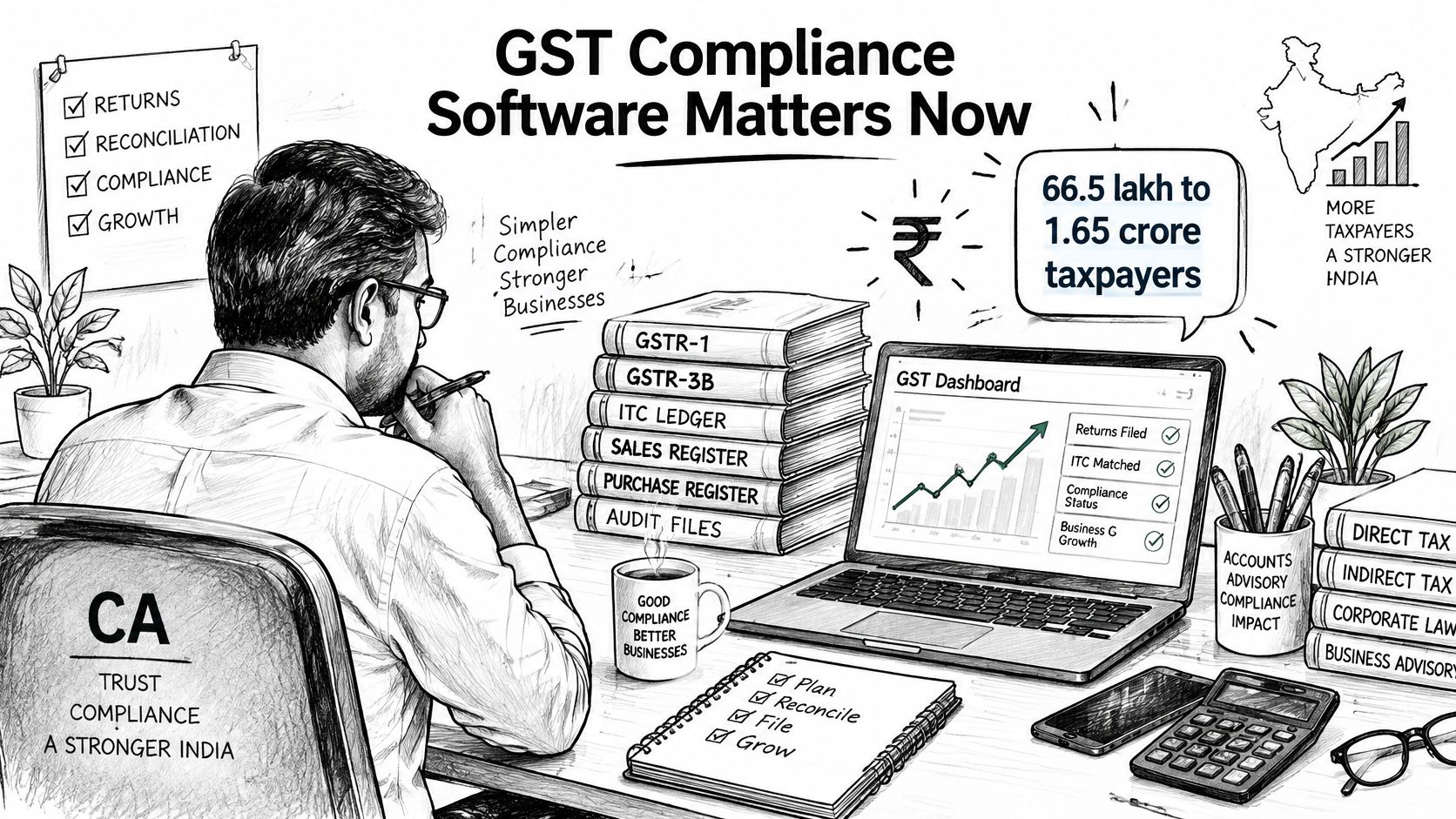
The GST Network operates as the shared technology platform behind registration, returns and payments. Every registered business leaves a data trail across those systems. A firm handling dozens of GSTINs faces that trail for every client, every month, and each unexplained entry in it becomes someone's problem to resolve.
What the Category Actually Does
In one sentence, GST compliance software connects bookkeeping with GSTR-2A and GSTR-2B, e-invoice, and e-way bill data, classifies mismatches, tracks due dates, and keeps evidence for review. That definition matters because it excludes tools that only calculate tax or only file a return.
The readers who feel a poor choice first are CA partners, GST specialists, bookkeepers working in TallyPrime, litigation teams, and operations managers carrying deadline risk across the client book. Each group reads the same data differently, so a single feature list misleads all of them.
The practical question, then, is what a wrong pick costs. A mismatch nobody can explain, a filing decision nobody recorded, a deadline that surfaces late: each of those failures has a price in staff hours and client trust, and each multiplies across the client book. That is the basis for scoring these tools, weighted by the damage each failure does rather than by a raw count of features.
Scoring Criteria for Reconciliation, Filing and Audit Support
| Criterion | Workflow | Test on your own data | Weight (of 100) |
|---|---|---|---|
| Multi-field matching rules for GSTIN, invoice number, date, taxable value, tax | Reconciliation | Match one purchase register to GSTR-2B and count false matches | 15 |
| Audit trail for each accept or reject decision | Audit support | Open one decision and check which rule and fields produced it | 15 |
| Exception categories and ageing report | Reconciliation | Confirm missing, mismatch, timing, and duplicate are separate and age | 10 |
| Original source values kept after import | Audit support | Compare an imported invoice with the source file, cell by cell | 10 |
| E-invoice and e-way bill ingestion | Reconciliation and filing | Upload one month and check invoice reference numbers survive | 10 |
| Due-date calendar by registration type | Filing | Set a quarterly client and check GSTR-1, GSTR-3B, and PMT-06 dates | 10 |
| Bulk processing and refresh speed | Scale | Import a full year for your largest client and time a re-run | 10 |
| Tally export with voucher checks | Bookkeeping | Export a batch, reopen in TallyPrime, and check balances | 5 |
| Notice and litigation log | Audit support | Record a notice and confirm its reply deadline is tracked | 5 |
| Pricing and data-use terms | Commercial | Get written answers on unlimited items, token expiry, and client-data use | 10 |
Why Two Rows Carry the Most Weight
Multi-field matching and the audit trail each carry 15 points because they protect the same decision from opposite sides. A credit decision can depend on GSTIN, invoice number, invoice date, taxable value, and tax amount at once, so matching on invoice number alone will create false confidence. If the tool then cannot show which comparison produced an accept or reject, the firm owns a conclusion it cannot defend.
Ingestion quality sits close behind. Research using GSTN records reported e-invoice penetration among eligible taxpayers rising from 12% in Q4 2020 to 78% in Q1 2024, on-time filing rising from 67% to 82%, and the GSTR-1 to GSTR-2B mismatch rate falling from 8.4% to 4.2%, as reported in empirical research on GSTN records and e-invoice adoption. A tool that drops the Invoice Reference Number or normalises values without preserving the source will struggle as that volume grows.
Scoring rule: Award full marks only when a feature works on your file, half when it needs manual preparation first, and zero when it's absent or unexplained.
Reweighting for a Different Firm
Don't treat these weights as fixed. A litigation team should raise notice tracking and audit trail, even if that means lowering bulk processing. An operations team managing many clients should raise the calendar and bulk processing, because one missed date repeats across the book.
Reweight before the trial, not after you've seen a polished demo. A tool can score well overall and still fail your firm outright if it scores zero on the workflow you run every day.
Measuring Reconciliation Quality Beyond Speed
| Metric | How to calculate | Reference point |
|---|---|---|
| Matched-invoice rate | Matched invoice lines divided by total lines | 84% rising to 95% after weekly reconciliation in a Pune advisory case study |
| Automatically classified share | Lines classified by rules divided by total lines | Record your own baseline in the trial |
| Residual exception rate | Lines still in exception after the first matching pass | Record by exception category, not as one total |
| Time from mismatch to documented resolution | Days between detection and the recorded accept or reject | Track ageing for unresolved items |
| Refresh latency | Time to re-run matching after new supplier data arrives | Time it on your largest client file |
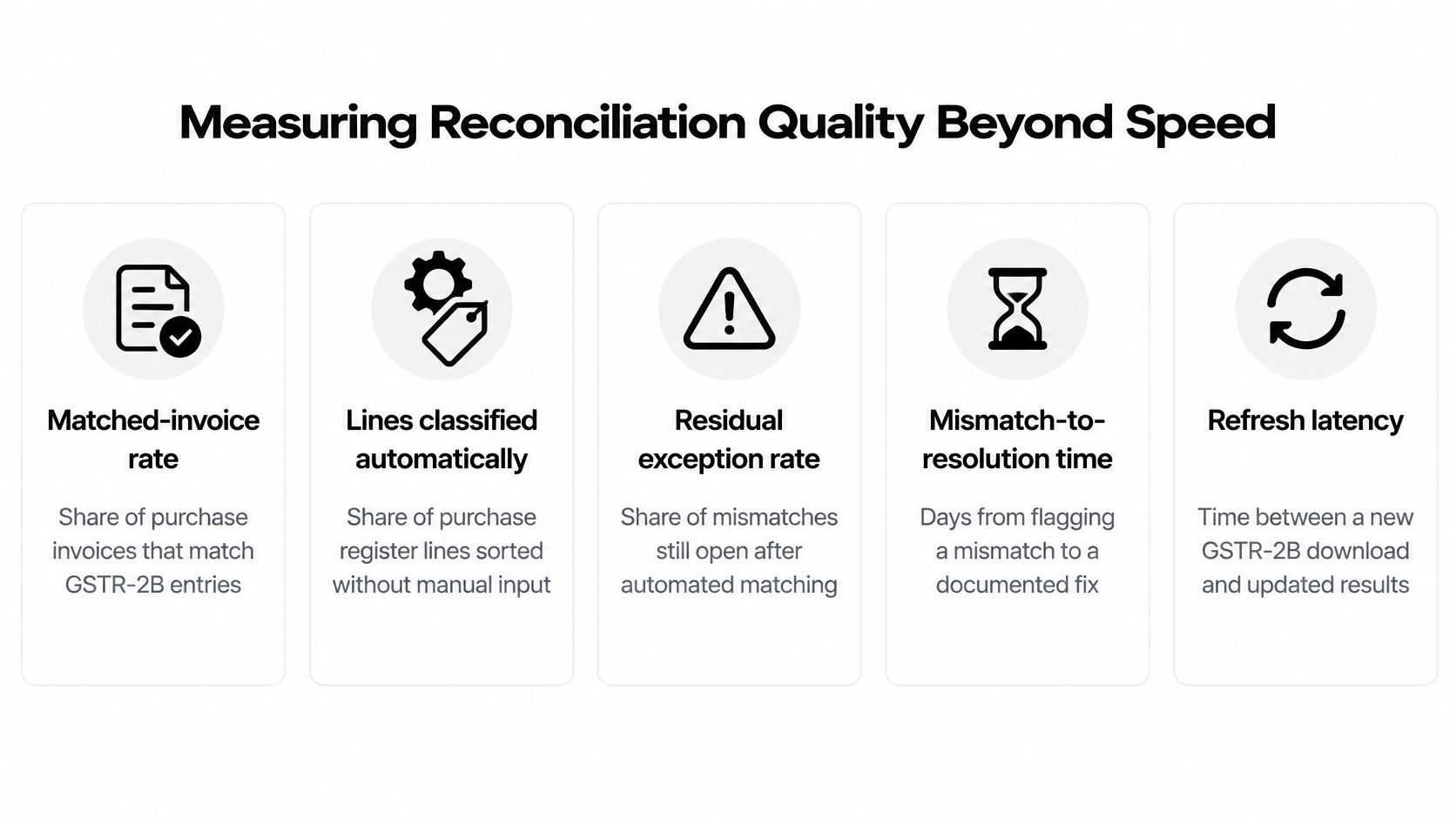
A six-month study of a Pune-based GST advisory firm found GSTIN errors and invoice-value mismatches made up more than half of reconciliation exceptions, and moving from monthly to weekly reconciliation with structured supplier follow-up raised the matched-invoice rate from 84% to 95%, according to a Pune GST advisory reconciliation case study. That finding reframes what buyers should measure. The problem wasn't import speed, it was exception quality and follow-up cadence.
Separate Supplier Errors From Your Own
Split exceptions by cause before you blame or credit the software. A supplier's GSTIN error needs supplier follow-up and an ageing report. Your own data-entry error needs better ingestion, duplicate detection, and tolerance rules.
If a tool lumps both into one mismatch bucket, your team will chase suppliers for errors sitting in your own purchase register. Require separate categories for missing, mismatch, timing, and duplicate items, and check that open items age visibly. The same discipline helps when staff test a bank reconciliation workflow alongside GST matching, because unresolved items in either process need an owner and a date.
The number of invoices imported is a vanity metric. Unresolved exceptions are where staff time and credit risk accumulate.
What Each Classification Must Show
Every classification should display the fields compared and the rule applied. That record matters because GSTIN, invoice number, invoice date, taxable value, and tax amount can point in different directions on the same invoice. Original source values must survive import so a reviewer can compare the tool's version with the file the client supplied.
For high-volume clients, the Pune study recommends reconciliation automation or GST-portal API integration, since manual exception categorisation consumes the most effort. As one example, Charter AI offers unlimited GSTR-2A and GSTR-2B reconciliation matching returns against the books without requiring a portal connection, and unlimited reconciliation for GSTR-2B, e-invoices, and e-way bills. Judge any such claim by the five metrics above, measured on your largest messy client, not a clean sample file.
Filing Deadlines and Notice Tracking Compared
E-invoicing began on 1 October 2020 for B2B transactions and exports for taxpayers with annual aggregate turnover of ₹500 crore or more. The threshold fell to ₹10 crore from 1 October 2022 and then to ₹5 crore from 1 August 2023, as recorded in government reporting on e-invoicing and return filing milestones. Sequential filing of GSTR-1 before GSTR-3B also became mandatory from 1 October 2022. Each change pulled smaller clients into system-generated reporting and tightened the link between invoice data and the payment return.
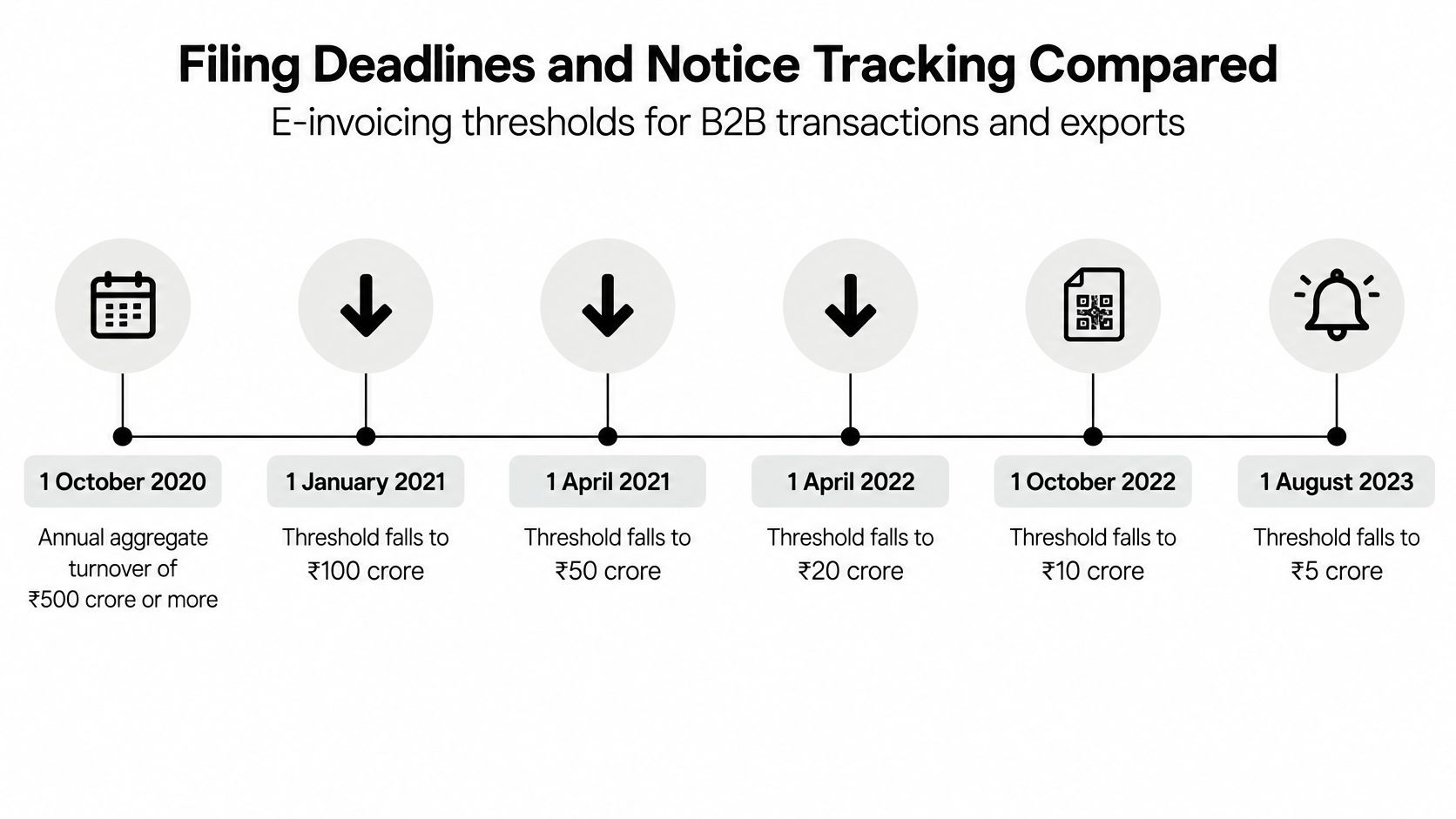
A calendar listing only return dates can no longer carry a firm's filing risk. The tool must know which clients sit inside e-invoicing, which file quarterly under QRMP, and which still pay monthly. Filing volume concentrates sharply around statutory dates, so a calendar that is wrong or silent on even one registration type multiplies missed-deadline exposure across the whole client book on the same day.
Features Worth Comparing Side by Side
- Registration-based calendar: dates should appear automatically once the client's registration type is set, rather than relying on staff to add each return manually.
- Layered reminders: look for reminders 7 days before, 1 day before, and on the day, so a busy week does not erase an early warning.
- Daily digest: one view should name what is due and for whom, so a partner can spot risk without opening every client file.
- Mark done with undo: staff need to close items quickly, and reverse an accidental closure without losing the record.
Charter AI's compliance calendar is unlimited for every client, shows GST, TDS, ITR, and client deadlines, and sends reminders 7 days before, 1 day before, and on the day. Its daily digest lists what is due, such as GSTR-3B due on 20 October for specific clients. Test that behaviour against the dates shown on the due dates calendar using one monthly and one quarterly client.
The Trust Test for Dates and Notices
Every due date should show its statutory source and the date it was last reviewed. Where a vendor cannot show where a date came from, staff verify it manually, and the calendar adds work instead of removing it. This row deserves the highest weight on any scorecard, because a wrong date is not a data error. It is a late fee plus an unrecorded decision about who was supposed to check it.
For notices, check four things. The tool should log each notice against the client, record its status, track the reply deadline, and calculate that deadline from the notice date. Then run one test before scoring: ask the vendor to place a quarterly client and a monthly client side by side and confirm both calendars carry GSTR-1, GSTR-3B, and PMT-06 dates where they apply. If either calendar needs manual correction, score the filing row at half marks.
Pricing Models and What Each Costs a Firm
| Pricing model | How it is charged | Cost behaviour | Hidden cost to check |
|---|---|---|---|
| Per client | Fee for each client profile per year | Rises with the client book, predictable per client | Add-on fees for extra registrations or entities |
| Per return or per document | Charge for each filing, invoice, or upload | Spikes in the 20th-of-month filing rush | Caps on invoices, statements, or reconciliations |
| Per user seat | Monthly fee for each login | Rises with headcount | Whether partners and bookkeepers each need a paid seat |
| Flat firm subscription | Fixed fee for the whole firm | Predictable, cost per client falls as the book grows | Fair-usage limits and what happens above them |
| AI token or credit add-on | Packs of tokens for drafting and research | Varies with drafting and research volume | Expiry at the end of the plan period and pack sizes |
Convert Every Quote to Cost per Client per Month
Headline prices hide the true comparison. Convert each quote into a monthly cost per client using your actual client count, then separate workflow costs from AI usage costs. Bookkeeping, reconciliation, export, and the calendar run every month, while drafting and research vary with notice volume.
For example, a quote of ₹24,000 a year for a 40-client book works out to ₹2,000 a month, or ₹50 per client a month. Add that month's token-pack spend before comparing it with a flat subscription. Otherwise you're comparing a workflow-only price with an all-in price and calling the first one cheaper.
Per-return pricing needs a peak-month test, not an average month, because filing concentrates around the 20th. Per-seat pricing needs a headcount test that includes partners who only review and bookkeepers who only upload. Flat subscriptions need the fair-usage clause in writing, including what happens above the limit.
Where Tokens Fit and Where They Don't
In our pricing, bookkeeping, reconciliation, Tally export, the compliance calendar, and the client vault are unlimited and use no tokens, with no caps on statements, invoices, reconciliations, or clients. AI drafting and research draw on add-on token packs of 2 lakh tokens for ₹1,149 plus GST, 4 lakh for ₹2,099 plus GST, and 8 lakh for ₹4,399 plus GST, valid until the end of the current plan period.
That split is the point to test with any vendor. Estimate tokens per notice reply during the trial, multiply by your expected monthly replies, and only then choose a pack size. If routine reconciliation consumes credits, your busiest month becomes your most expensive month for the wrong reason.
Matching Tool Profiles to Firm Types
| Firm profile | Dominant workflow | Must-have criteria | Pricing model to favour |
|---|---|---|---|
| Small practice, few clients, one GST specialist | Filing calendar and notice replies | Due-date calendar, notice log, low fixed fee | Per client or flat subscription |
| Mid-size firm with TallyPrime bookkeeping | Reconciliation and voucher export | Multi-field matching, Tally export, bulk processing | Flat subscription with unlimited bookkeeping |
| Litigation and appeals team | Notices, replies, and orders | Audit trail, source citations, notice log | Token add-on packs sized by a trial |
| Operations-led firm with many clients | Deadline tracking across clients | Client-wise calendar, daily digest, ageing reports | Per client with an unlimited calendar |
| Firm with many quarterly MSME clients | Quarterly GSTR-1 and GSTR-3B with monthly PMT-06 | Registration-type calendar showing both cadences | Per client |
Why the Quarterly Profile Drives Calendar Requirements
A 2024 Deloitte India survey found nearly 70% of respondents believed quarterly GST return filing for MSMEs was beneficial and improved compliance, according to Deloitte India's survey on seven years of GST. Many small clients now file quarterly GSTR-1 and GSTR-3B while paying monthly through PMT-06. One firm therefore runs two cadences at once, and a calendar that assumes monthly filing for everyone will generate false alarms or missed payments.
Apply the reweighting logic from the scorecard here. A litigation team raises notice tracking and audit trail because an unrecorded reply date carries direct consequences. An operations team raises the calendar and bulk processing because its risk is volume, not legal complexity.
Buy for the workflow that would hurt most if it failed this month, not for the longest feature list.
Balanced Fit Warnings
A firm needing only e-invoice reporting for a few clients may not need the full stack, and paying for litigation features it won't use wastes budget. The opposite error is just as common. A firm drafting many notice replies needs audit trail and source citations more than raw bulk speed, yet teams often buy on reconciliation throughput alone.
For context, Charter AI offers firm automation including bank statements, invoices, bookkeeping, TallyPrime, reconciliation, client documents, and a compliance calendar, all unlimited. It also offers nine free tools with no sign-up and no AI, including a section finder, notice reply deadline tool, MSME 45-day payment checker, bank reconciliation, depreciation schedule, tax audit applicability checker, cash payment limit checker, trial balance to balance sheet tool, and income tax calculator. Those free tools suit a small practice testing fit before committing to a subscription.
Confirm These Points Before You Sign
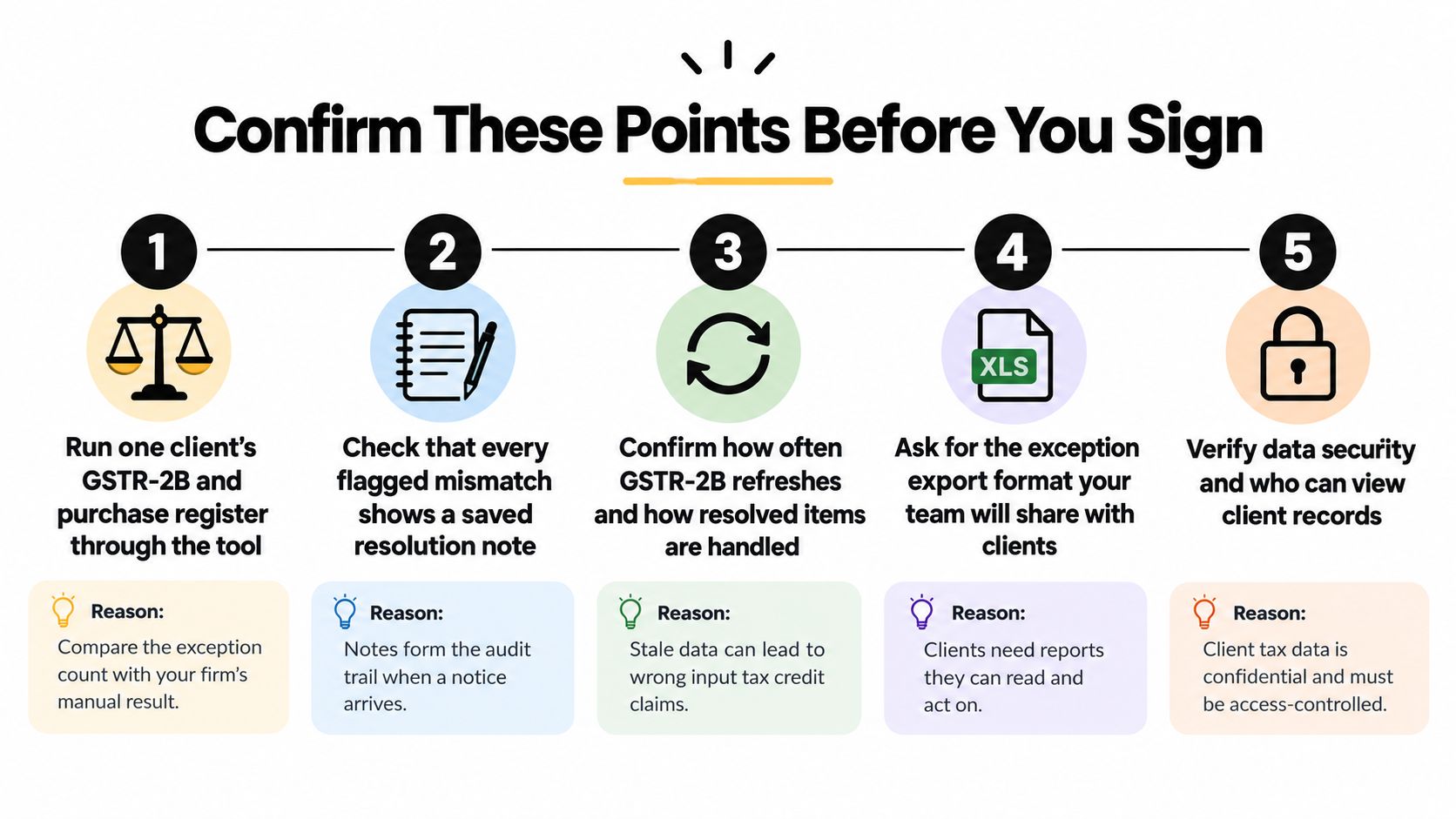
Run one real client through reconciliation: Put one client's GSTR-2B and purchase register through the tool and compare the exception count with your firm's manual result for the same period. A large gap in either direction needs an explanation before you proceed. Use a client with known supplier errors, since a clean file proves very little.
Inspect the reasoning behind each match: Check that each match shows the fields and rule that produced it, and that original values survive the import. Open one accepted invoice, one rejected invoice, and one timing difference. If you can't explain all three to a partner from the screen alone, the audit trail isn't doing its job.
Confirm fixed rules handle arithmetic and checks: Due dates, GSTIN and PAN checks, voucher balance checks, and GST 2A and 2B matching should run on fixed rules, not AI, with every limit, rate, and due date showing its source and last-reviewed date. In our workflow, AI doesn't do arithmetic or checks in bookkeeping, and bookkeeping auto-post checks cover voucher balances, matching the statement, GSTIN checksum, exact party match, and not a duplicate. Ask any vendor to state its equivalent checks plainly.
Export to TallyPrime and reopen the batch: Export one voucher batch, open it in TallyPrime, and check balances against the source file. Look for dates that have changed without notice, rounded values, or merged ledgers. Rework at this stage usually costs more staff time than the original data entry saved.
Test monthly and quarterly calendars together: Set up one quarterly client and one monthly client, then confirm both calendars show GSTR-1, GSTR-3B, and PMT-06 dates with the right reminders. Check the daily digest names the client against each date. This single test exposes most registration-type weaknesses.
Ask where review happens: Confirm whether review is built into the workflow or left to the user. We build review into the workflow, while a general AI chatbot requires manual review of every output. That difference decides who catches an error before filing, especially on a matter such as a GST ITC mismatch intimation under Rule 88D in DRC-01C.
Get pricing terms in writing: Record which items are unlimited, how tokens expire, and how seats are counted. Ask specifically about caps on statements, invoices, reconciliations, and clients. Verbal assurances about unlimited use aren't enforceable once the invoice arrives.
Confirm how client data is used and protected: Get written confirmation that client data isn't sold and isn't used to train models for other customers, and ask how documents are encrypted and who can view records. Client tax data is confidential, and access control is part of the compliance product, not an optional extra.
Check you can leave with your records: Confirm every record can be exported to Excel, including exception lists and decision history, in a format your team can share with clients. A firm that can't export its audit trail loses evidence if it changes vendor.
Setting the Pass Mark
Set the pass mark at 70 of 100 points on the scorecard before the trial starts, with no zero on multi-field matching, audit trail, or pricing and data-use terms. Score each step above as pass or fail and record the reason for any fail beside it. That written record protects the decision when a partner later asks why the firm chose, or rejected, a tool.
Buy only when the tool clears the mark on your own data. A vendor demo shows what's possible on prepared files. Your messiest client shows what your team will live with every month.
Run the scorecard on your own client files with Charter AI, which combines unlimited GSTR-2B, e-invoice, and e-way bill reconciliation with an unlimited compliance calendar, TallyPrime export, and review built into the workflow. Test multi-field matching, the audit trail, and monthly and quarterly calendars against the pass mark before you commit. Start your evaluation at Charter AI.